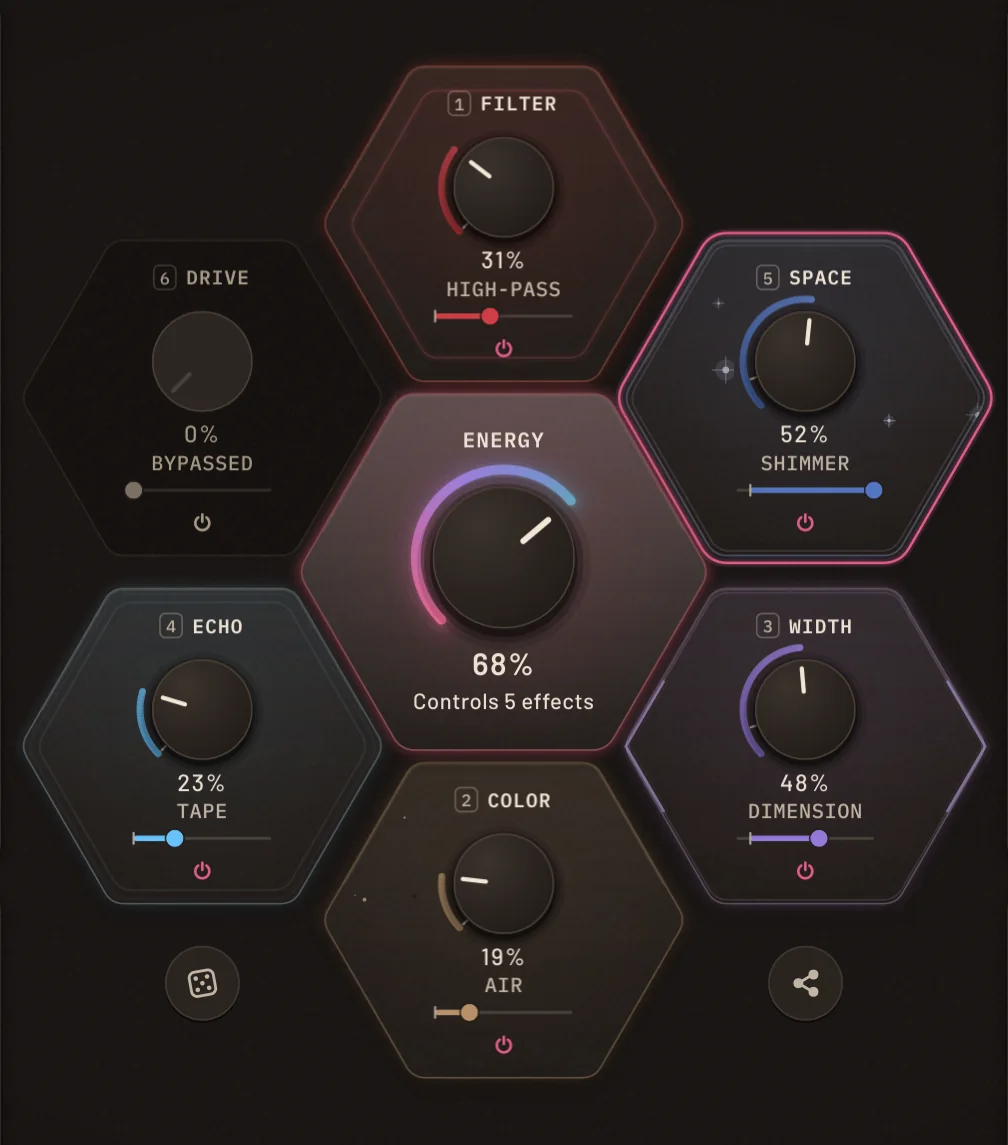
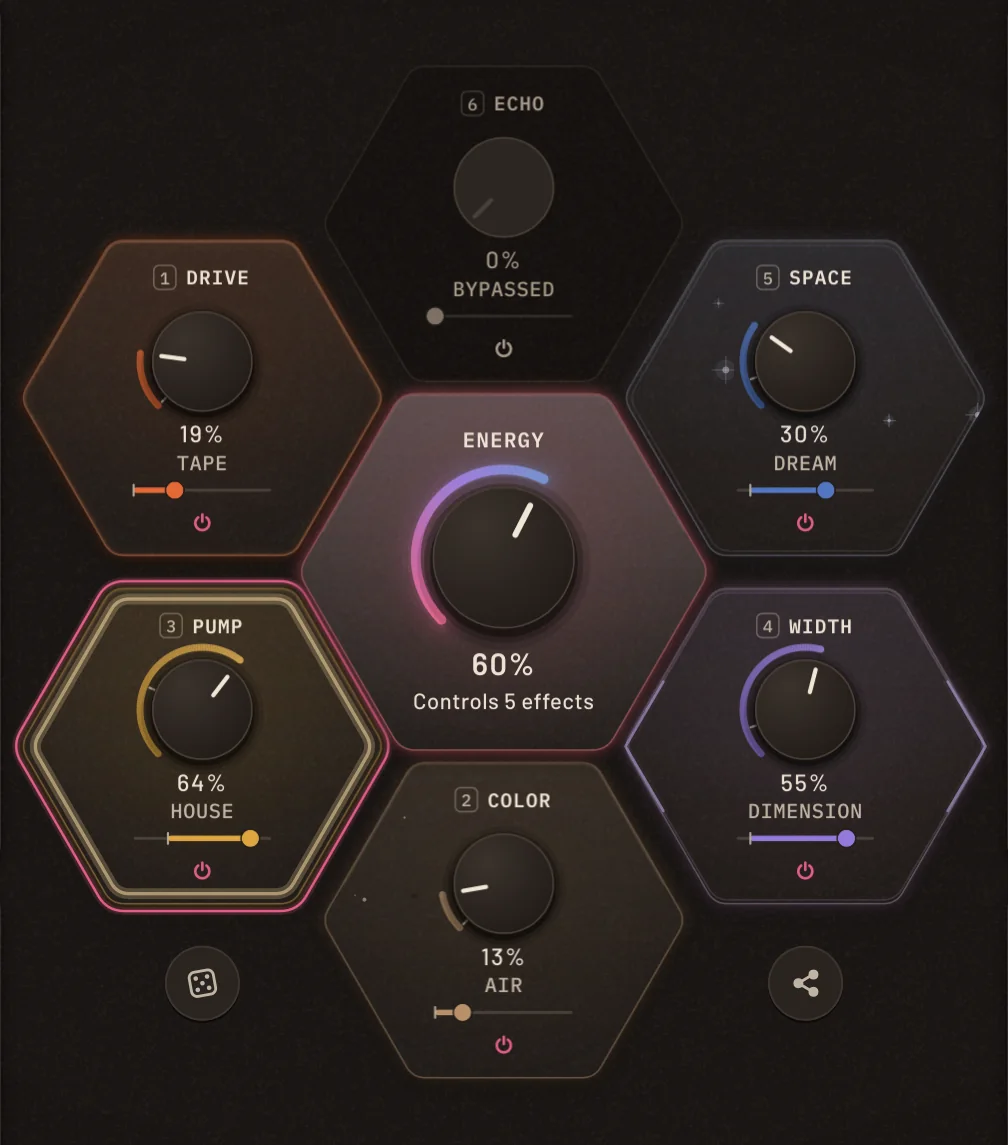
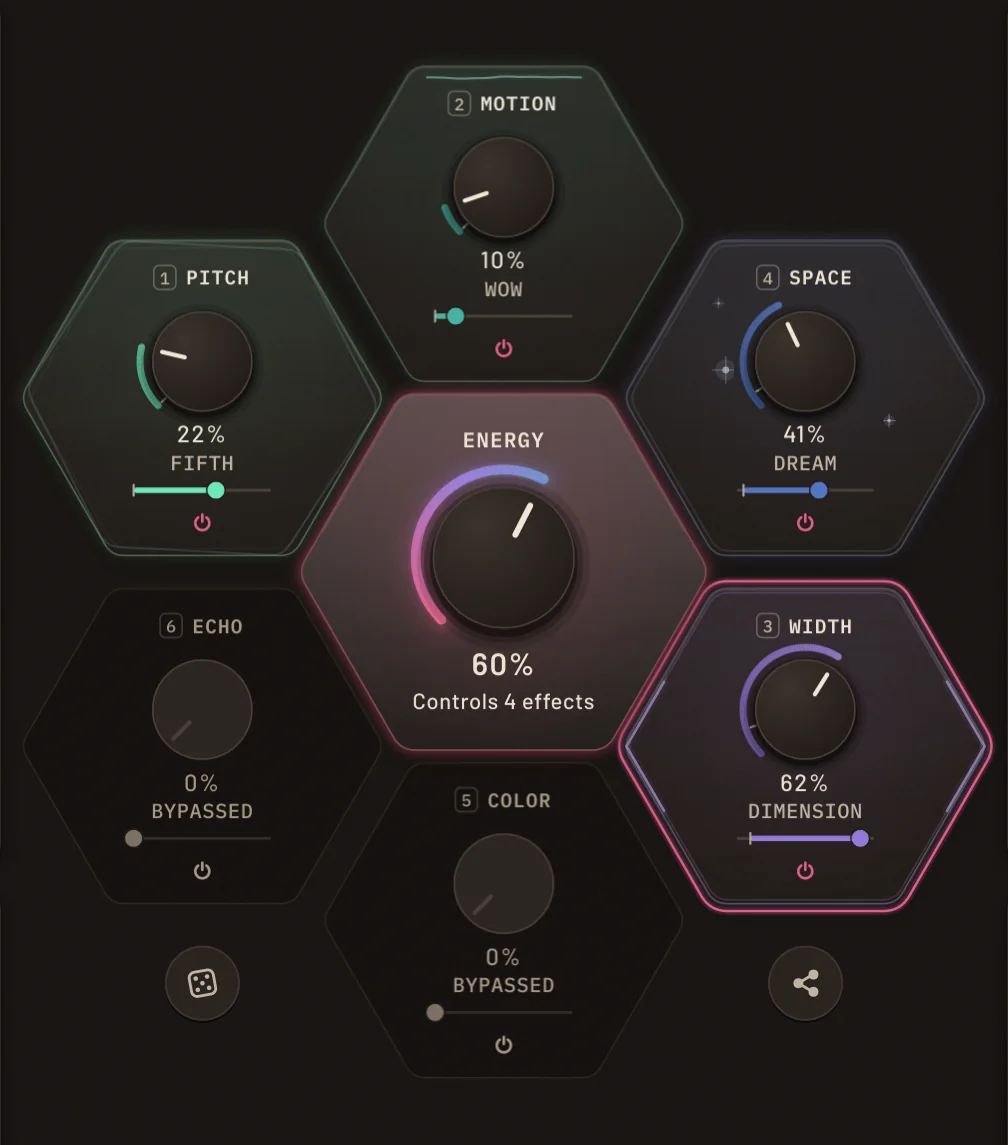
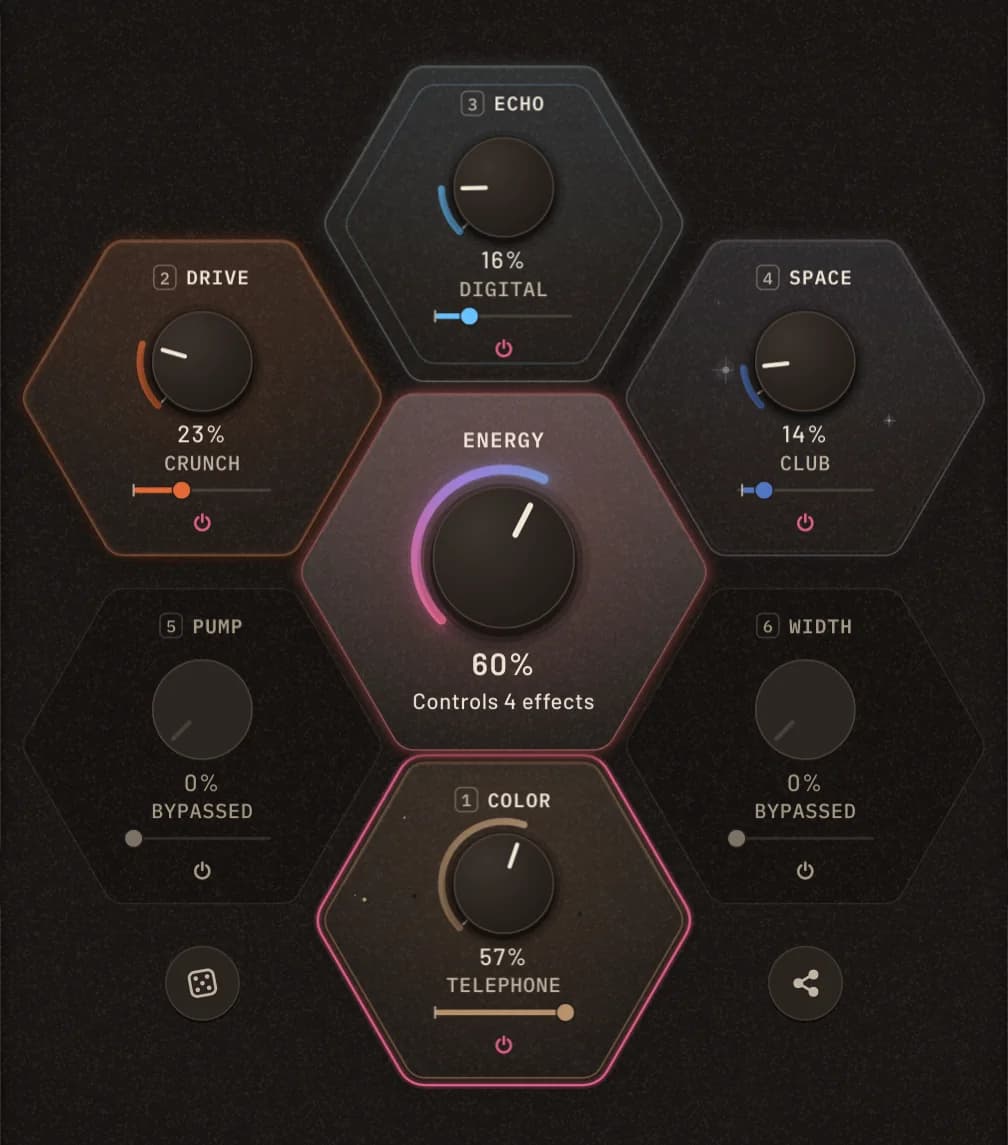
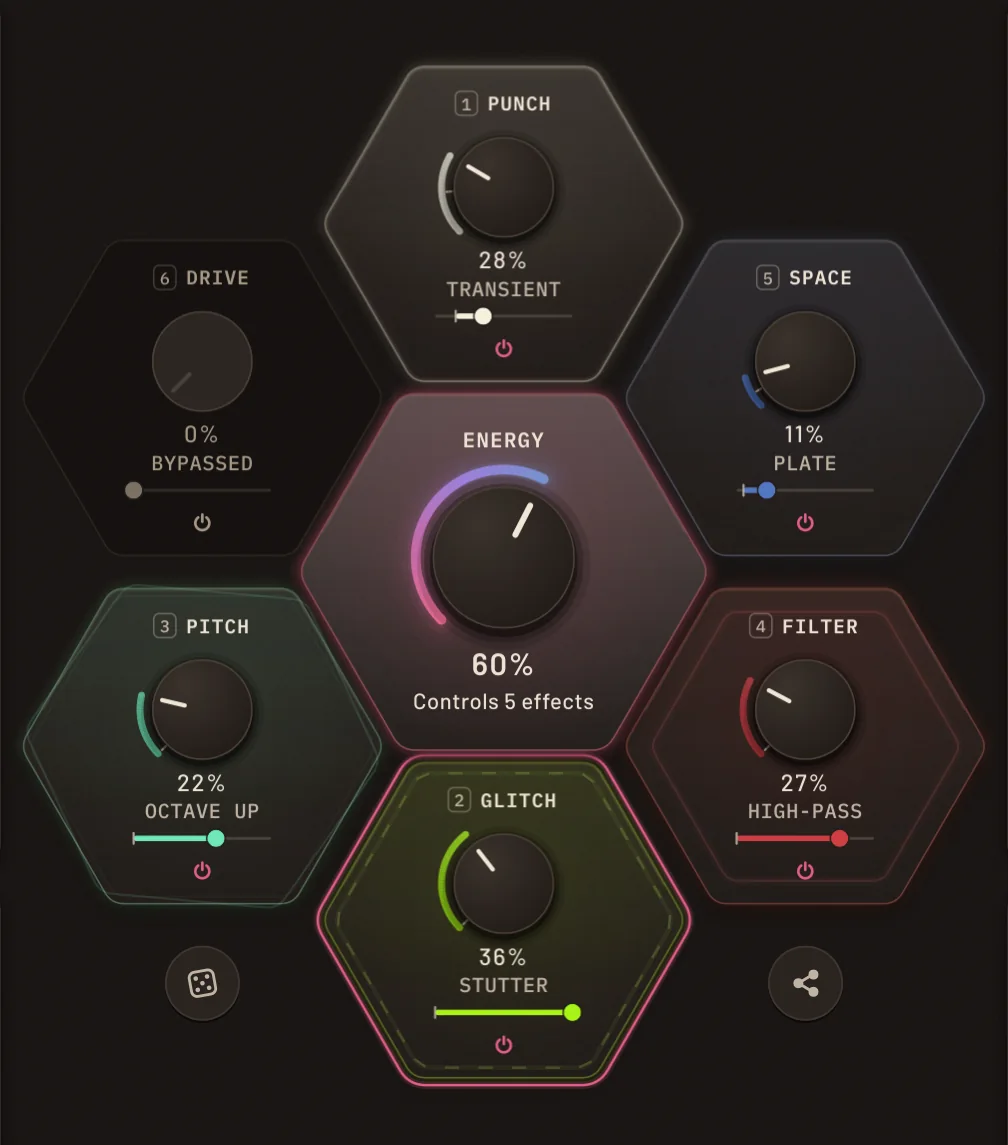
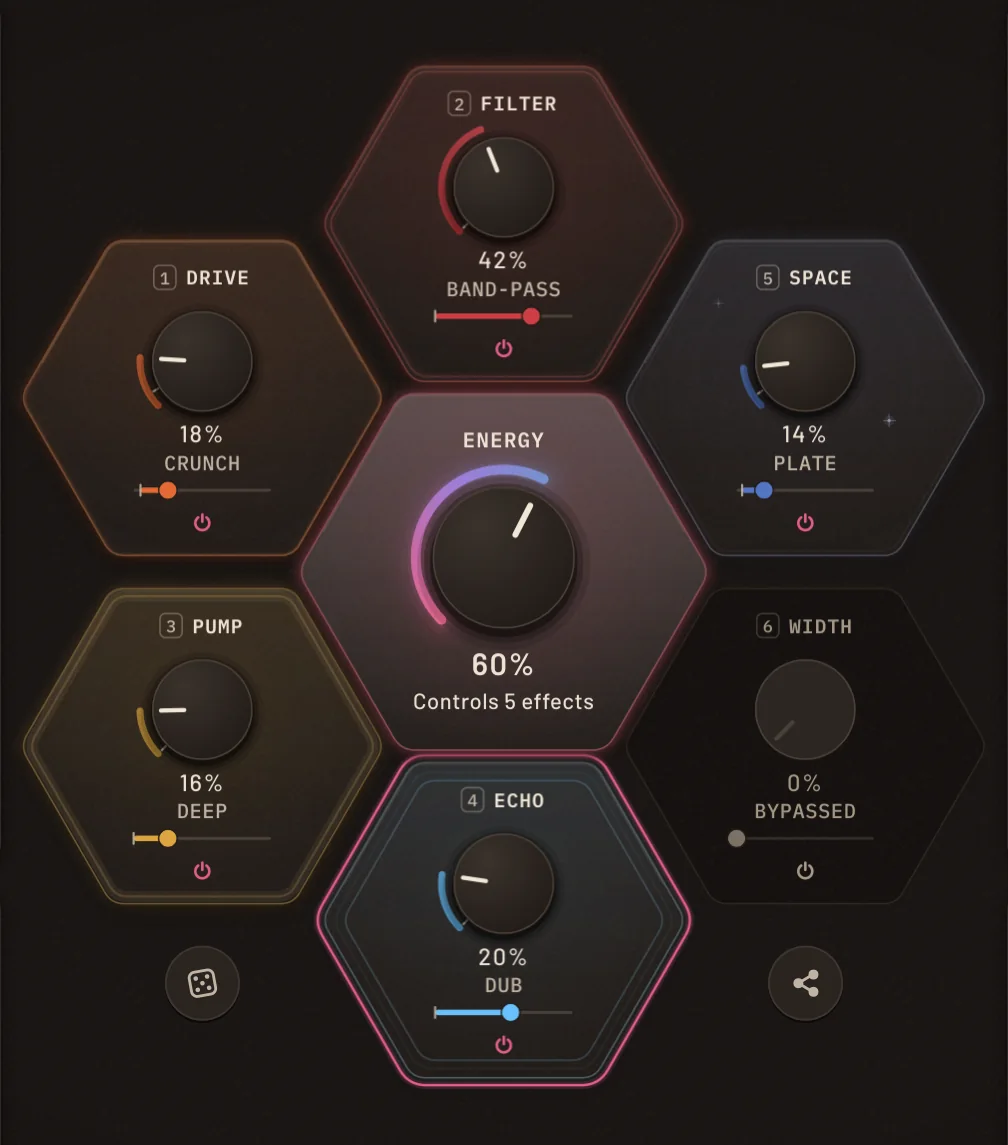
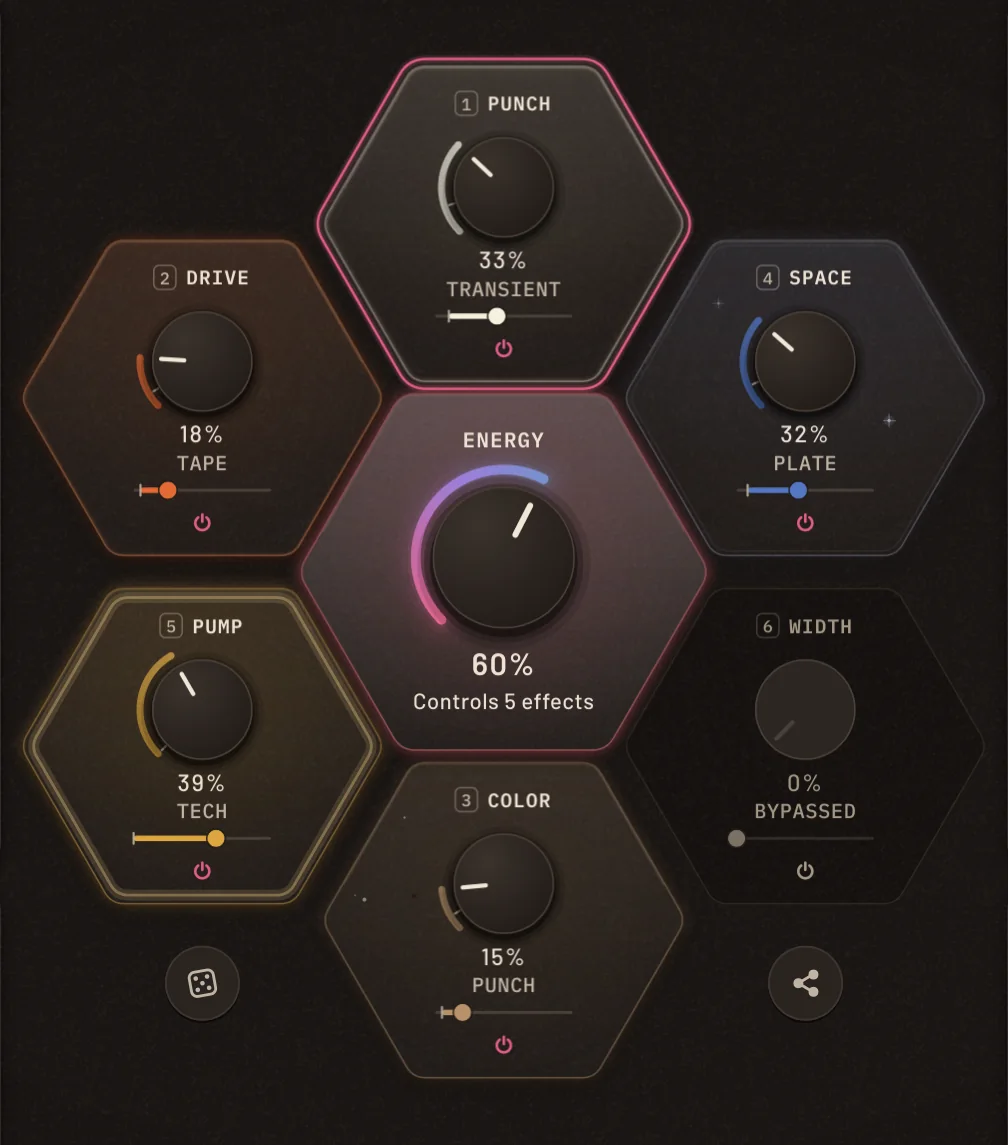
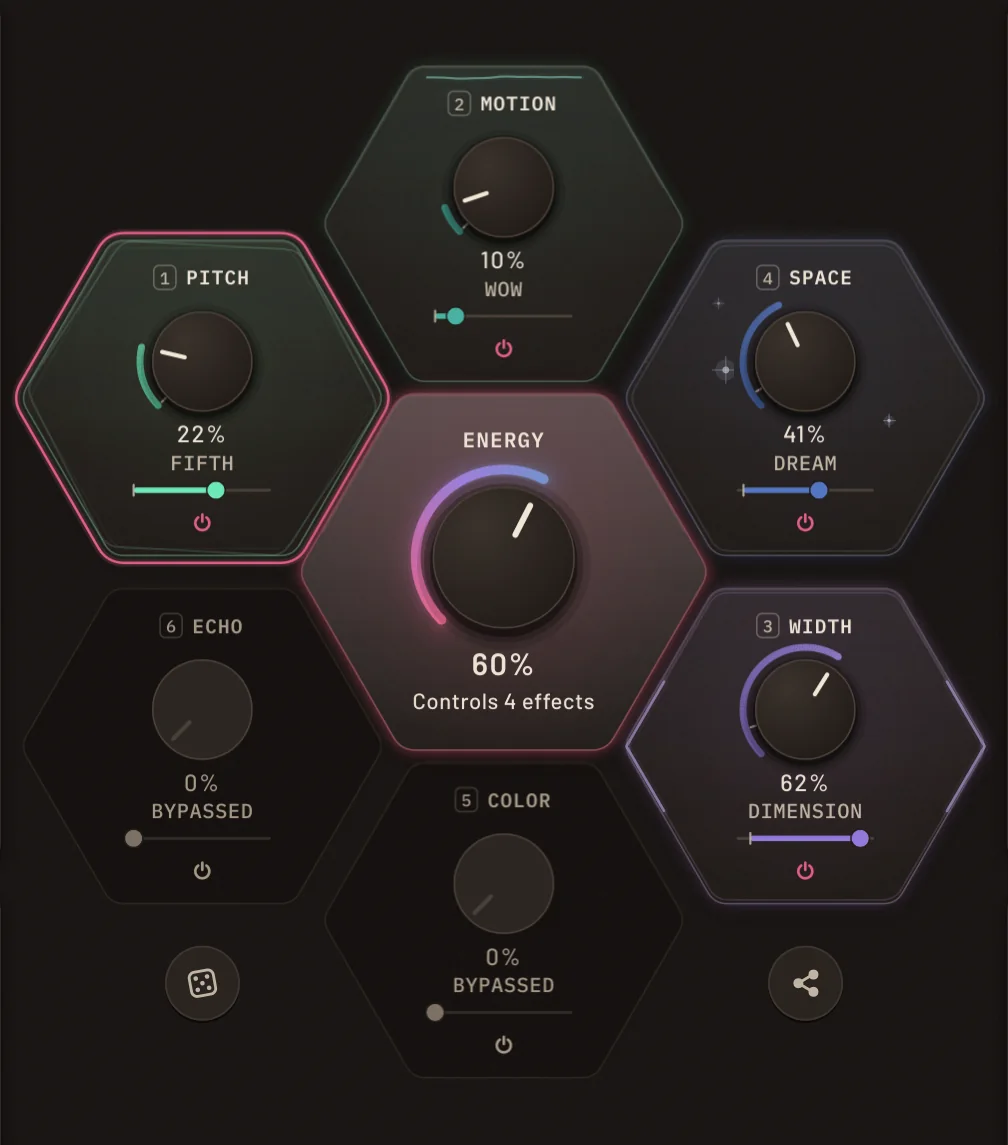
COLONY beta

Join the COLONY beta?

One click and you're in — no second confirmation, your address is already confirmed through the newsletter.

  • Send me the COLONY beta build before release
  • Email me when COLONY is out

Download started

COLONY is on its way — check your downloads.

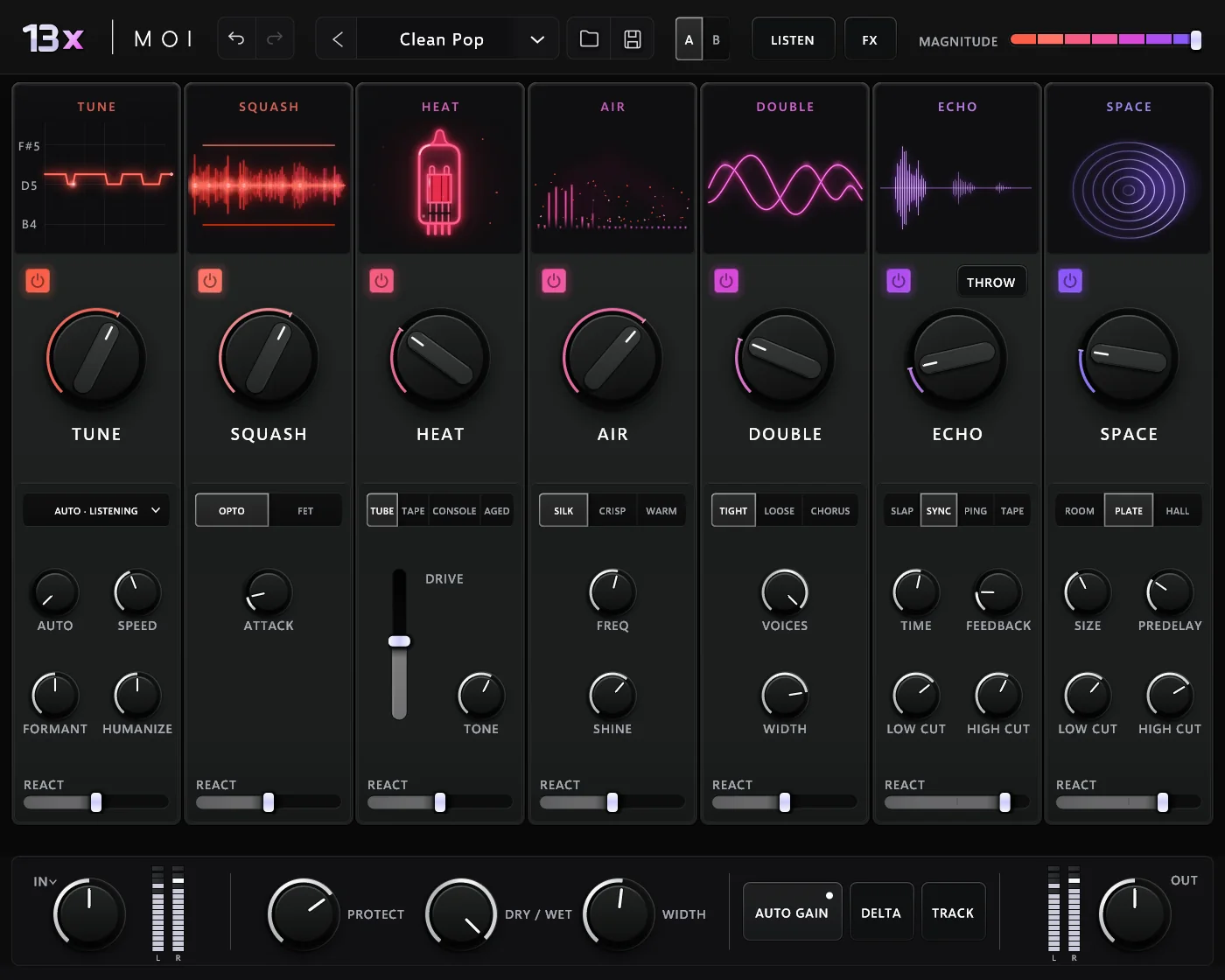
MOI's editor: seven module displays above seven large knobs, from TUNE to SPACE
Next free plugin

MOI — a free vocal chain.

Tuning, compression, saturation, air, doubles, echo and reverb on one MAGNITUDE knob. Hear it on its page.

One email when MOI is out. Unsubscribe anytime. Privacy

13X COLONY 2.0 FREE MULTI-EFFECT PLUGIN Vintage color. Infinite movement.

Eleven effects, from tape, fuzz and vinyl crackle to stutter, shimmer and filter sweeps, moved together by ENERGY: by hand, on the host's bars, by the level of your track or a 16-step sequence.

Eleven effects, moved together by ENERGY: by hand, on the bars, by your track's level.

Download COLONY — free →

macOS · Windows · Linux · no account, no license key

4,000+ downloads · Featured on Bedroom Producers Blog · Listed on KVR Audio

2.0 out nowFreeVST3 · AU · CLAP

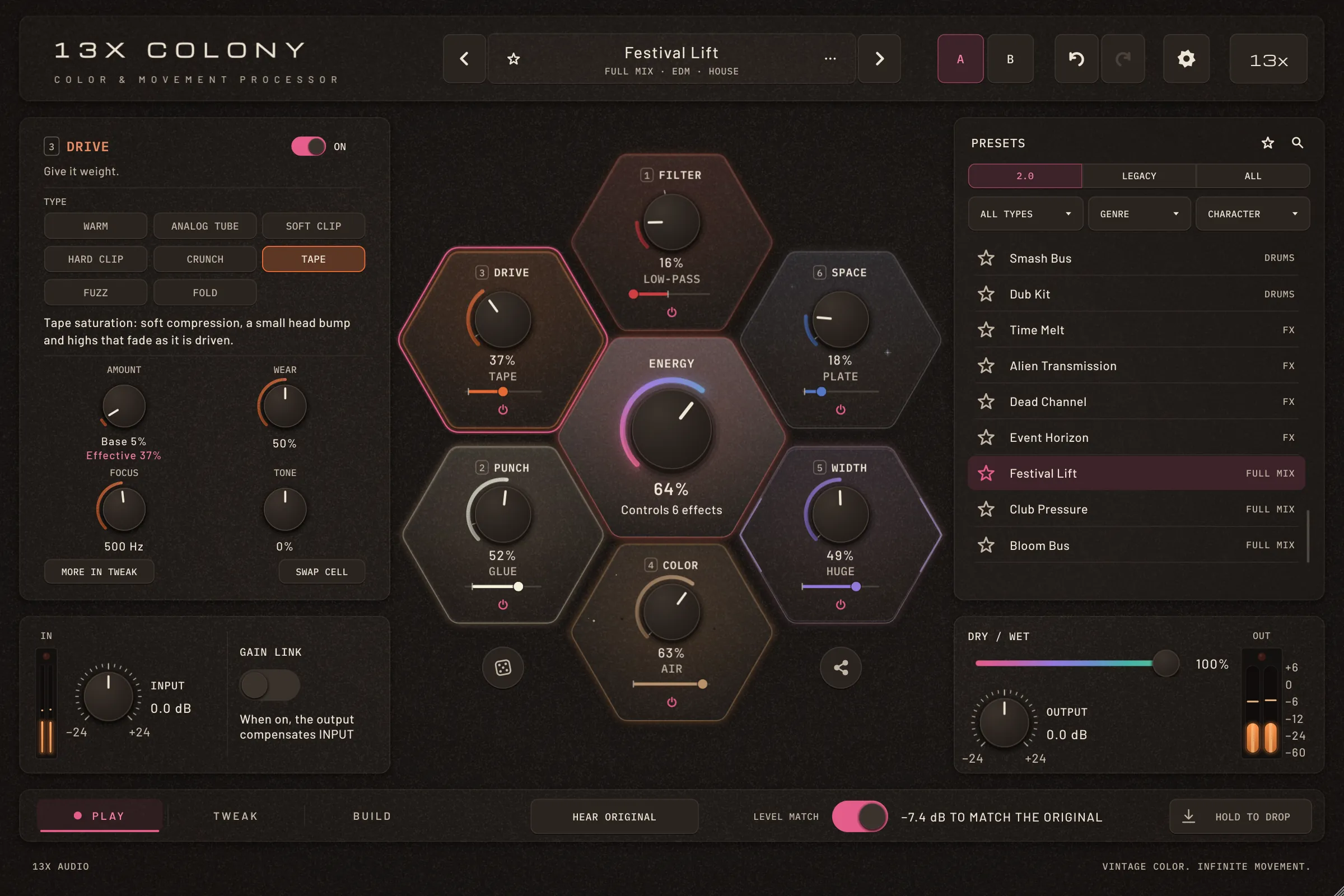
13x Colony 2.0 in PLAY with the preset Festival Lift at ENERGY 64 %: FILTER, DRIVE, SPACE, PUNCH, WIDTH and COLOR around ENERGY, DRIVE selected with its type Tape on the left, the preset browser on the 2.0 bank on the right, HOLD TO DROP in the bottom bar
The plugin's real interface, captured from the 2.0 build with music playing.

See Colony in action.

The COLONY 2.0 video, 1:27 minutes. Sound on.

The video plays from YouTube (privacy-enhanced mode) once you press play. Until then nothing loads from YouTube. Privacy

New in 2.0

A free update with five new Cells.

  • Eleven Cells

    GLITCH, ECHO, PUNCH, PITCH and FILTER join the six. Any Cell in any of the six places.

  • ENERGY plays itself

    Follow your track's level, step through 16 steps, morph from one sound to another, or hold to drop.

  • Modulation

    ENERGY, an LFO or an envelope on almost any knob. Eight routings, right-click to add one.

  • 54 new presets

    Builds, grooves, keys, plucks, leads and more, each with its own trick. The old ones stay, under LEGACY.

Everything new in 2.0

Turn up ENERGY. Watch the colony move.

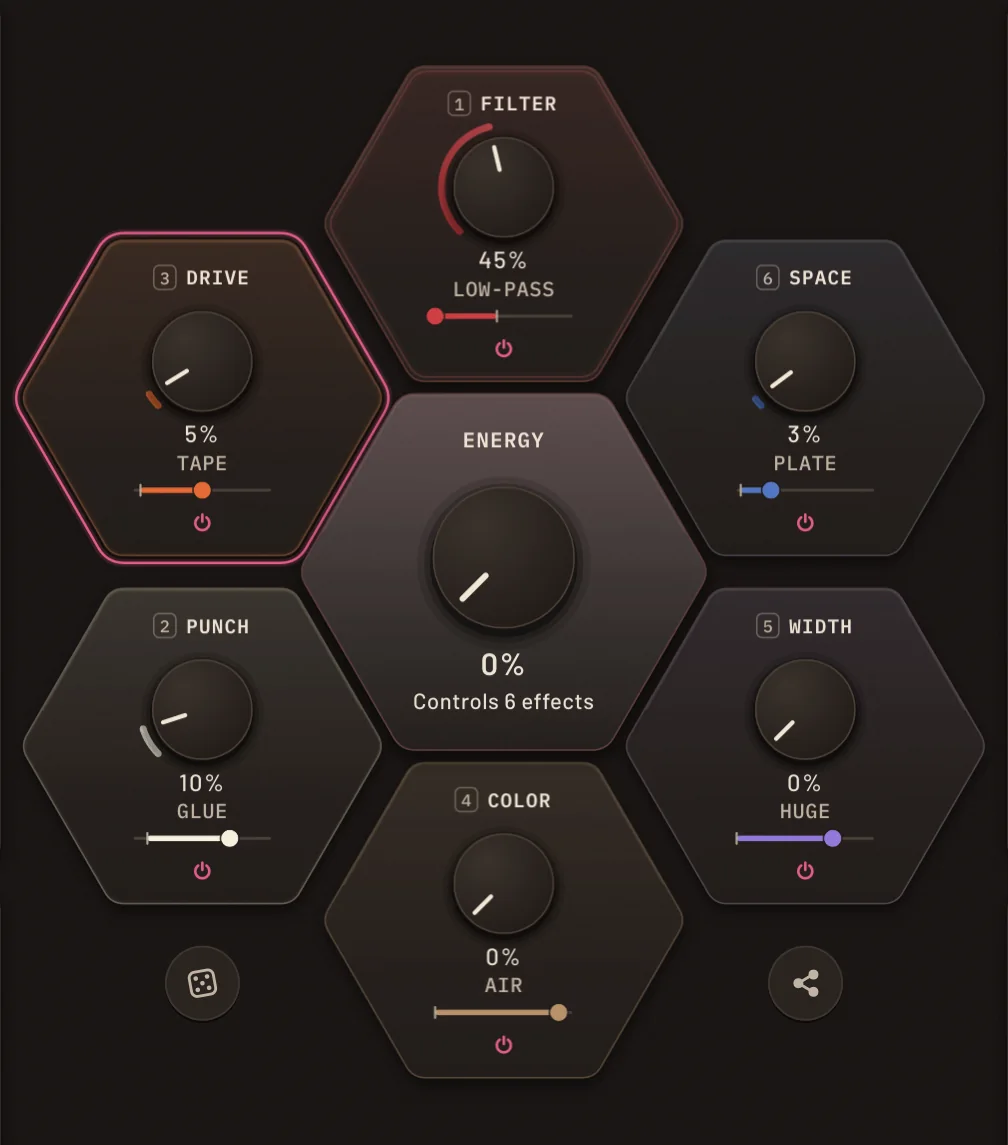
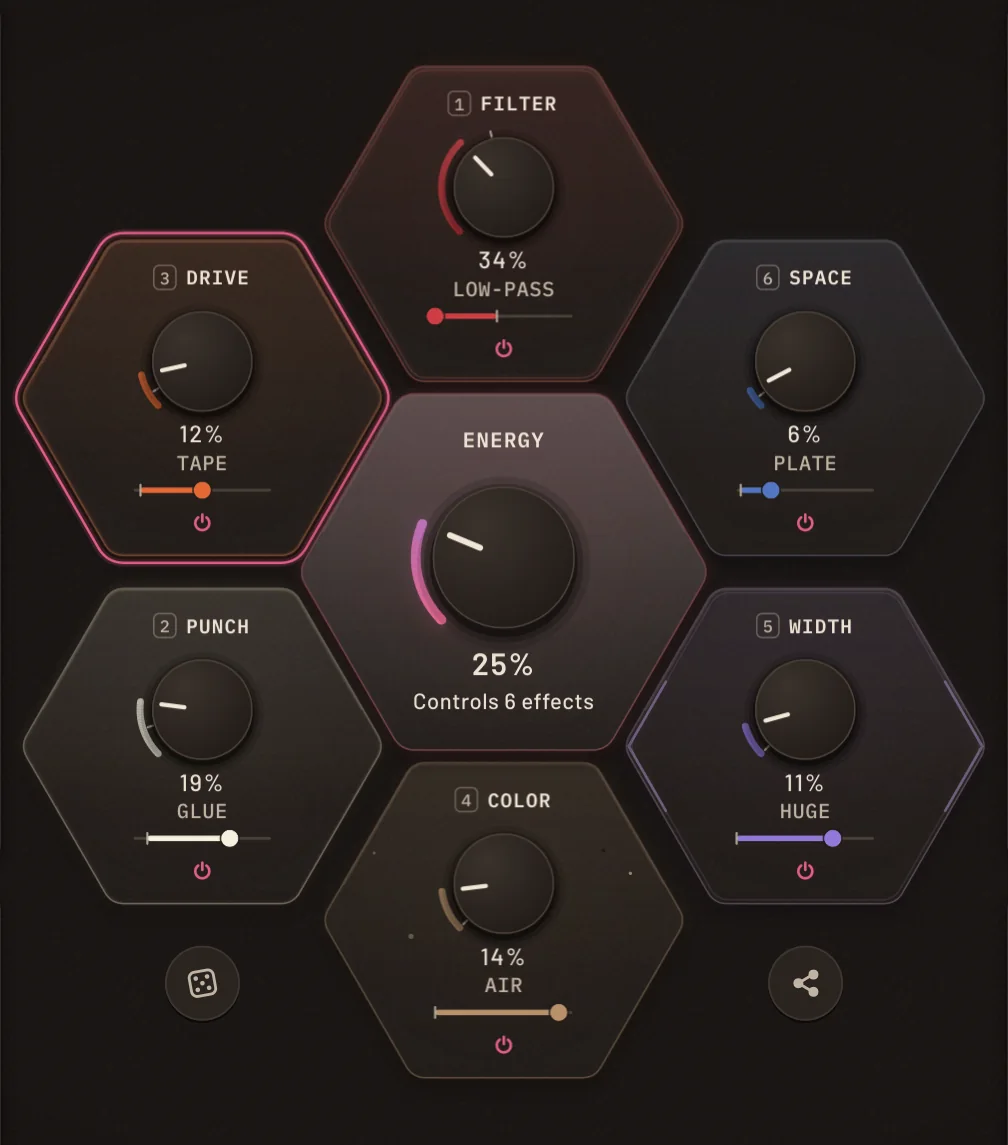
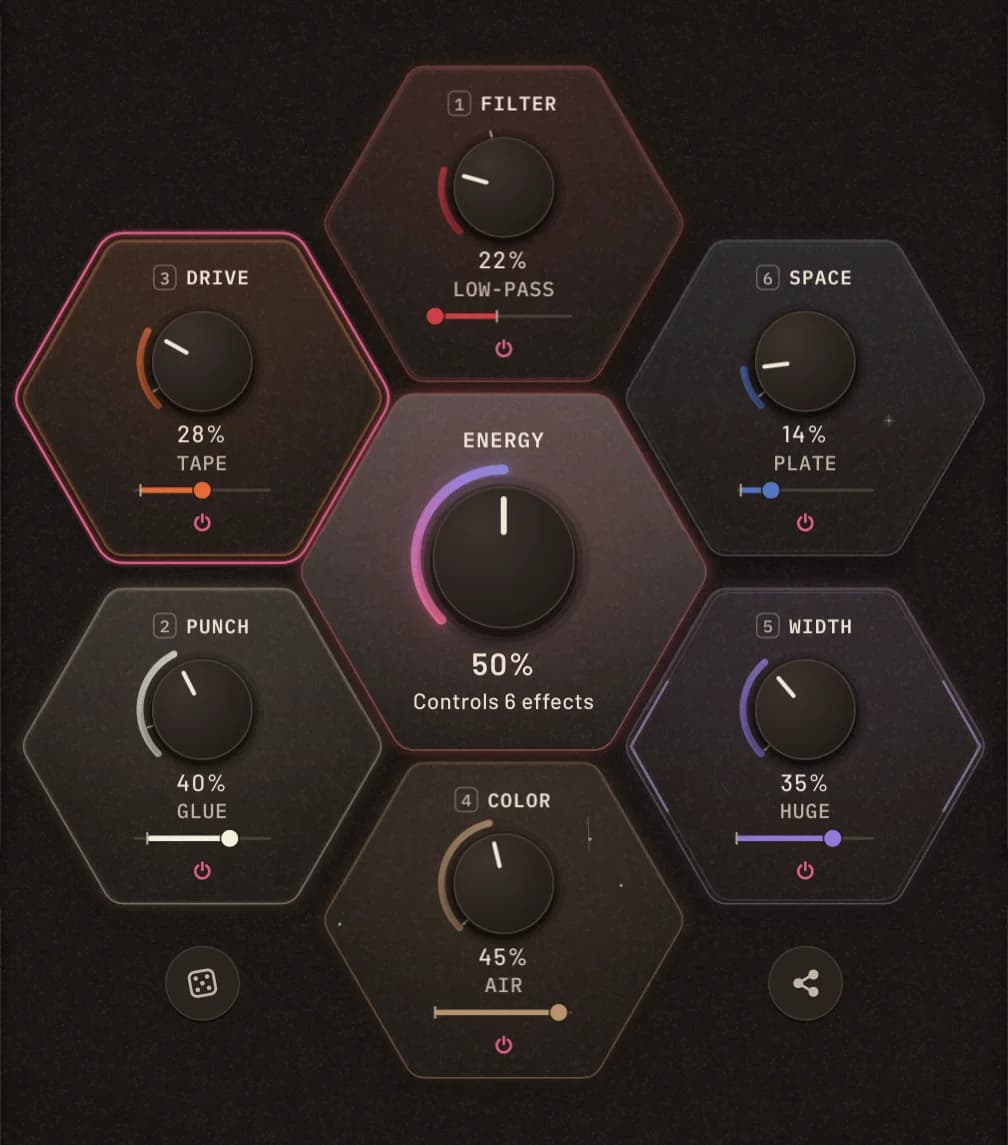
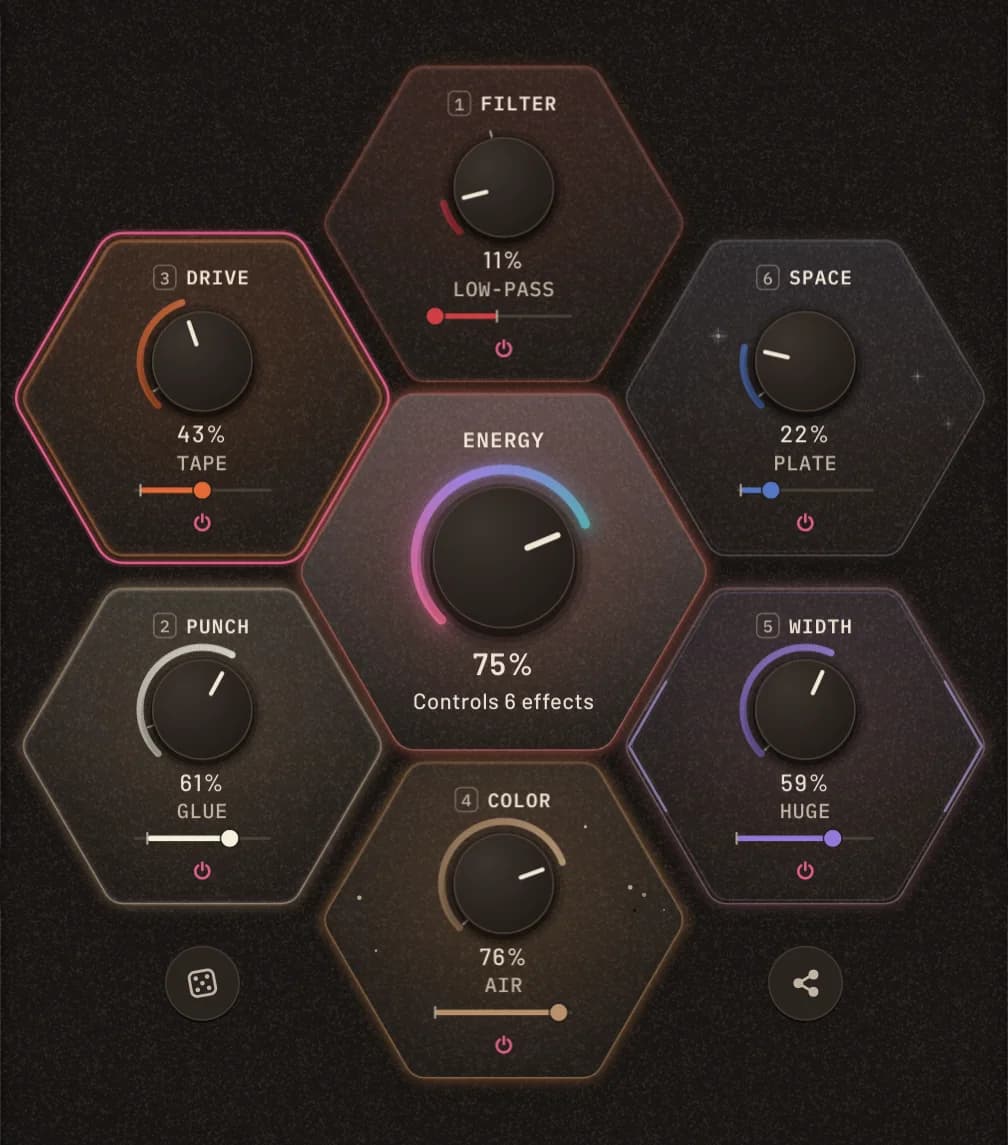
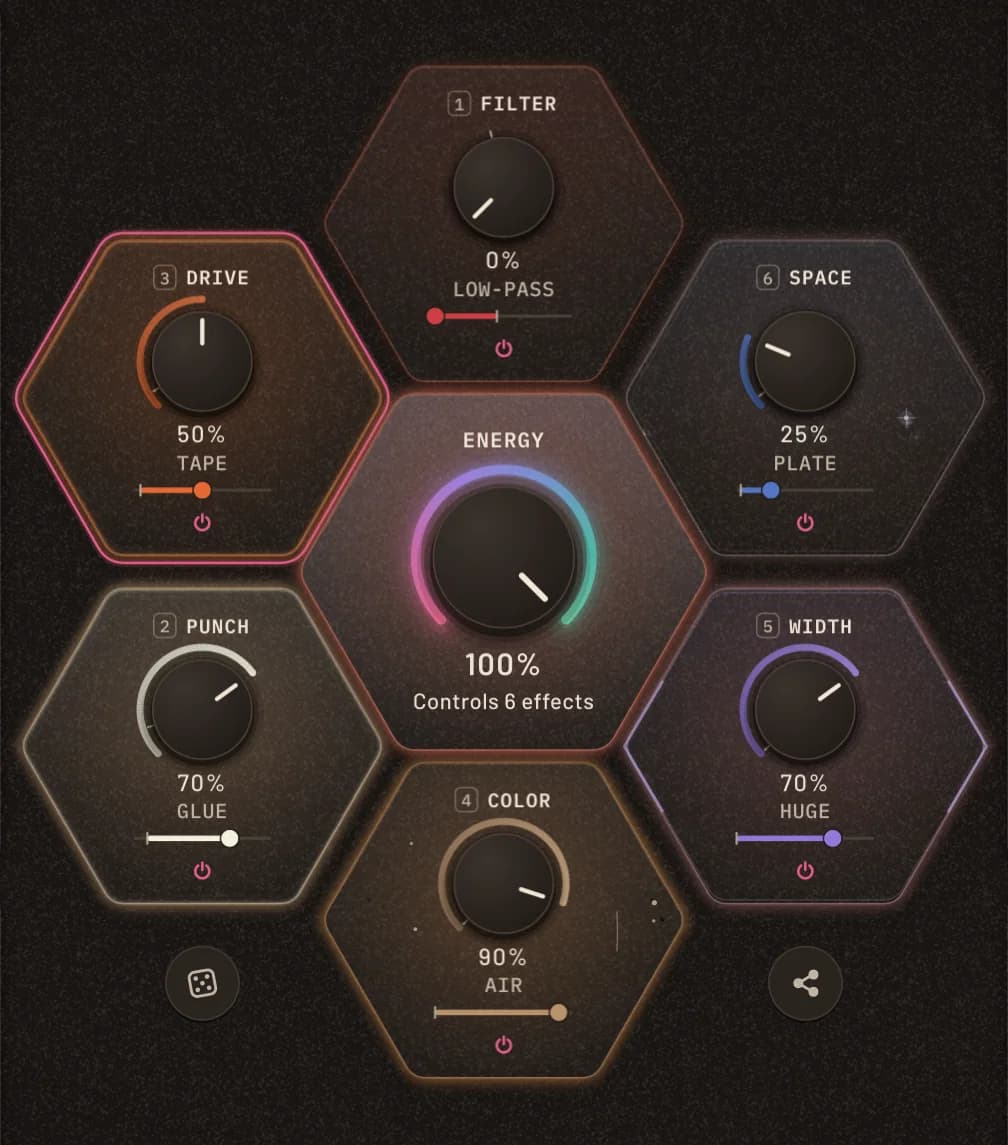
Real captures of the preset Festival Lift. As ENERGY rises, the low-pass opens while PUNCH, DRIVE, COLOR and WIDTH grow, every Cell along its own range, set in BUILD.

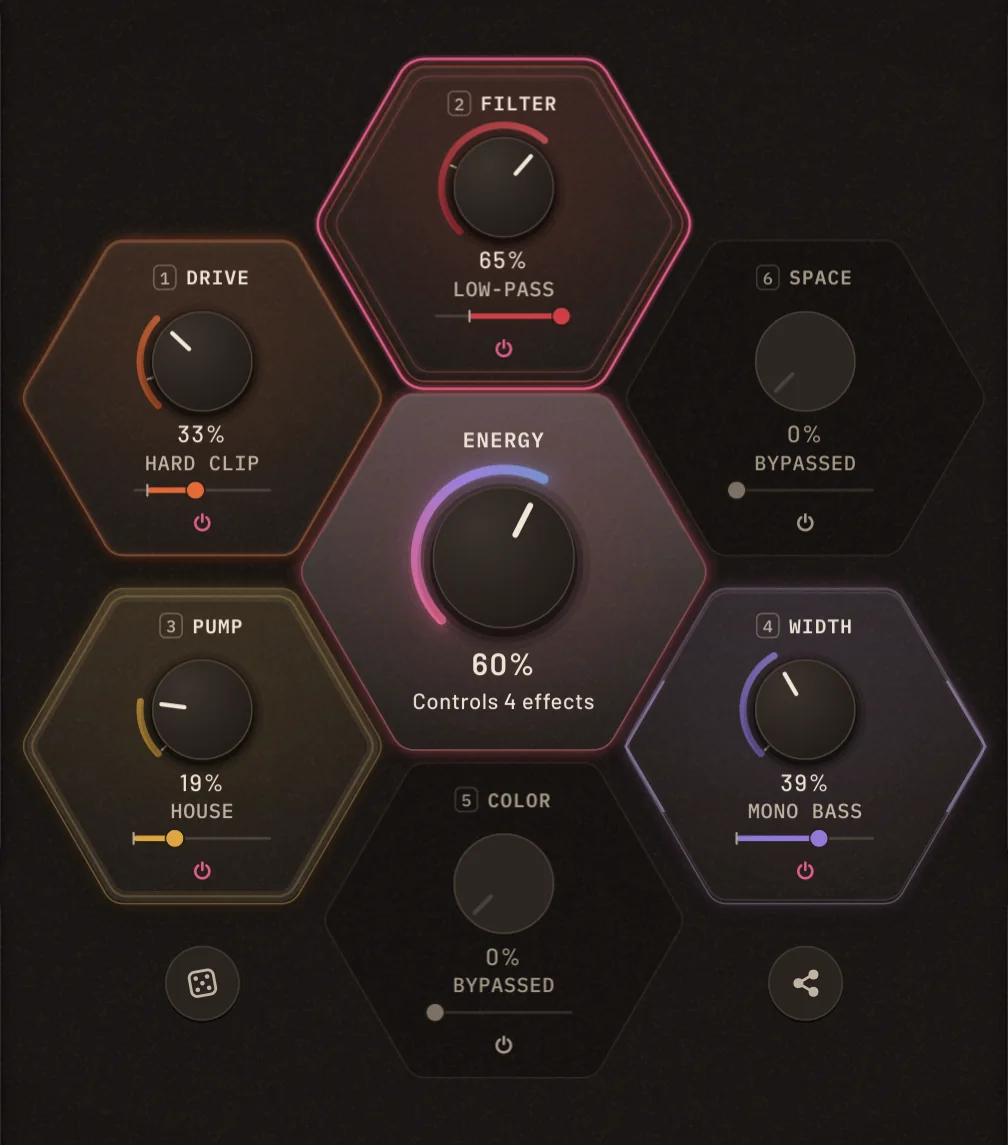
The Colony honeycomb at ENERGY 50 %: FILTER 22 %, PUNCH 40 %, DRIVE 28 %, COLOR 45 %, WIDTH 35 %, SPACE 14 %
  • FILTERLow-Pass22 %
  • PUNCHGlue40 %
  • DRIVETape28 %
  • COLORAir45 %
  • WIDTHHuge35 %
  • SPACEPlate14 %

The pale band is each Cell's range from ENERGY 0 to 100.

ENERGY can play itself.

Turn it by hand, automate it, or let Colony move it. Five sources, on the host's own bars and time signature.

  1. Manual

    Your hand, host automation or a MIDI controller.

  2. Loop

    A shape over 1 beat to 16 bars: Breathe, Rise, Fall, Lift & Return, Build, Square or Random.

  3. Trigger

    One shot on a button, a MIDI note or automation.

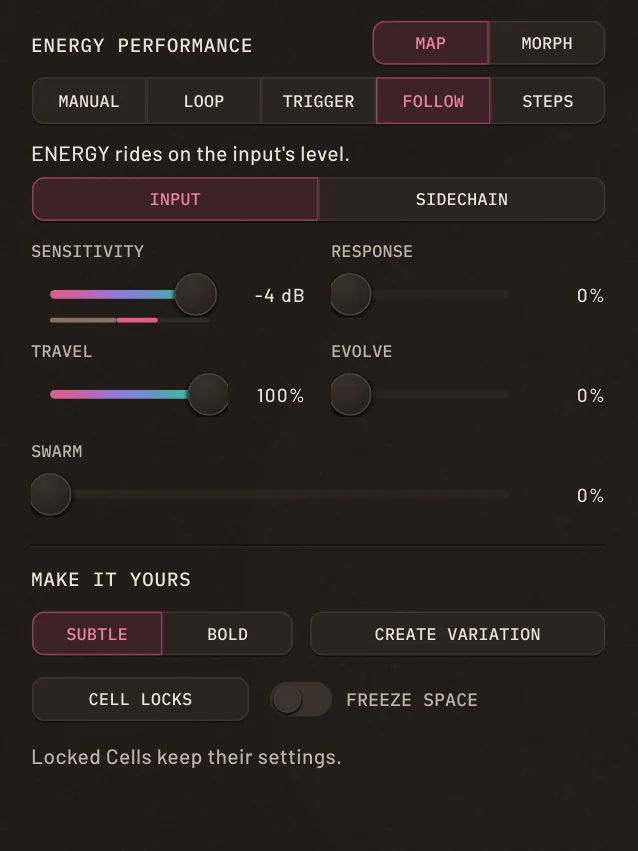
  4. Follow

    The level of your track or of the sidechain drives ENERGY, with Sensitivity and Response.

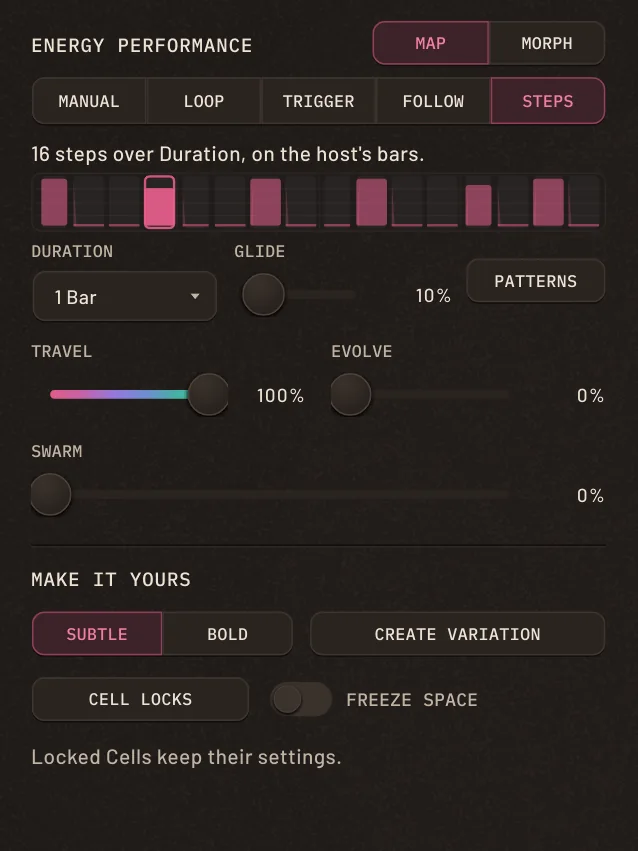
  5. Steps

    A 16-step sequence over the host's bars, with Glide and patterns.

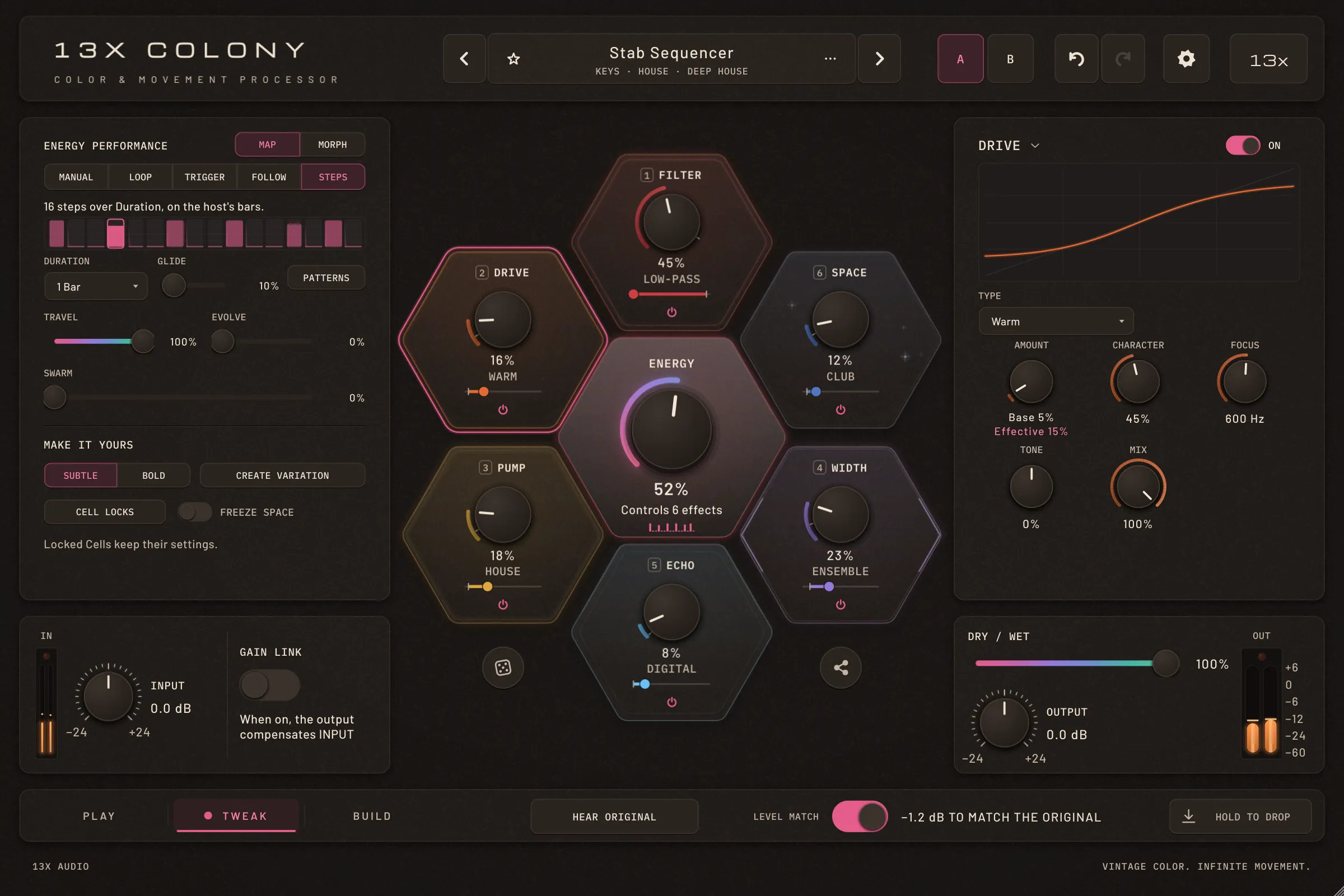
The ENERGY panel in TWEAK with the preset Stab Sequencer: mode Steps, 16 step bars with the playing step lit, Duration 1 Bar, Glide 10 %, Travel 100 %

Steps

Click or paint 16 heights. Each edge is smoothed over 30 ms, and step 1 always lands on the bar line.

The ENERGY panel in TWEAK with the preset Diamond Pluck: mode Follow, source Input, Sensitivity and Response

Follow

Loud parts push the Cells, quiet parts let them rest, with or without a running transport.

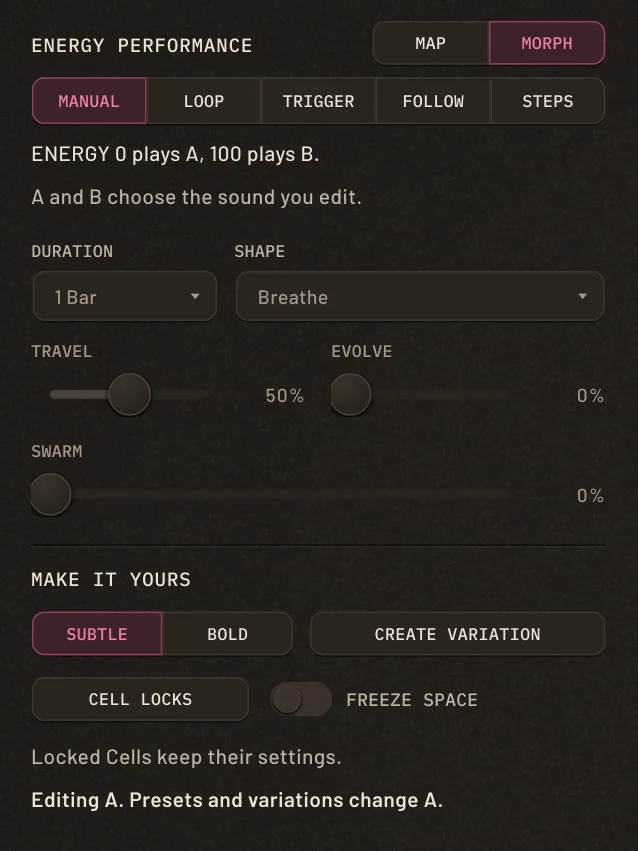
The ENERGY panel in TWEAK with the MORPH preset Morph Organ, MAP | MORPH set to MORPH, halfway between its two sounds

MORPH

ENERGY 0 plays sound A, 100 plays sound B. Knobs glide; types and the chain switch at halfway without a click.

SWARM

The rhythmic Cell — PUMP, MOTION or GLITCH — pushes the ENERGY of all the others: reverb and width breathe with the groove.

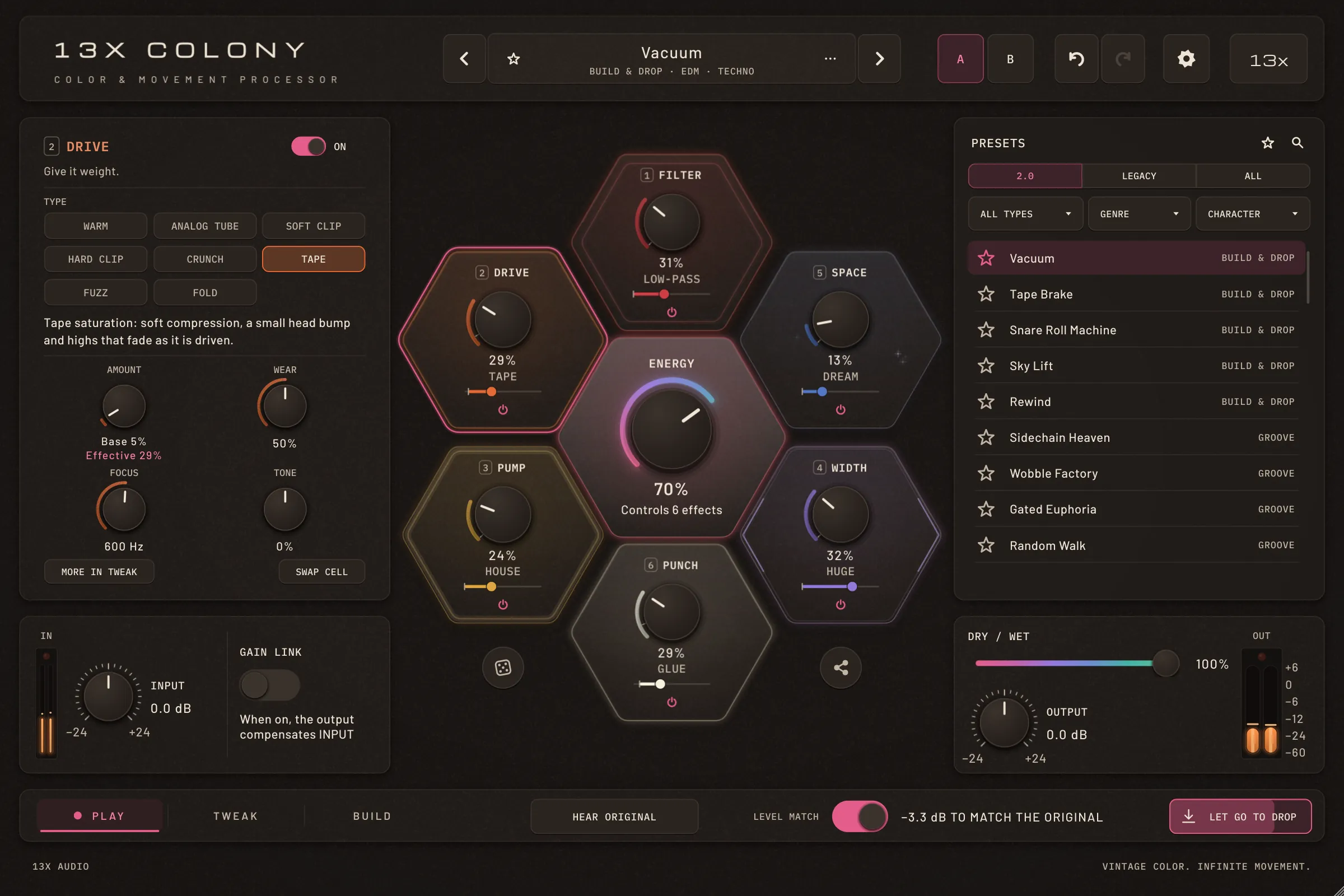
HOLD TO DROP

Hold the button: a high-pass and a noise riser build over 1, 2 or 4 bars. Let go: ENERGY slams to 100 % and falls back over a bar.

13x Colony in PLAY with the preset Vacuum while HOLD TO DROP is held: the button filling up with the riser's progress
HOLD TO DROP, captured while held.

Eleven Cells. Six places.

Every Cell can play in any of the six places, each once. Right-click a Cell, or press SWAP CELL. Pick one for its types, its editor and a preset that uses it.

Choose a Cell
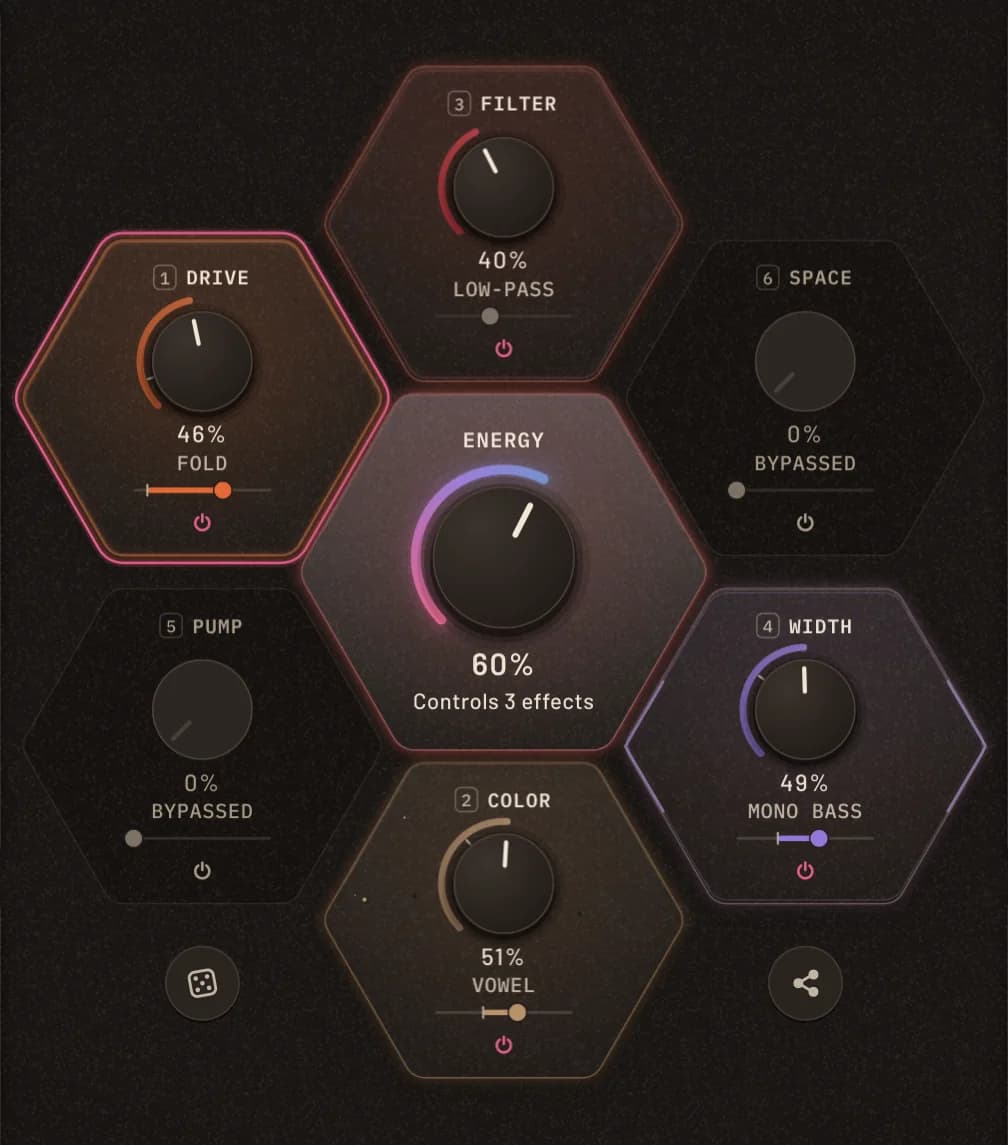
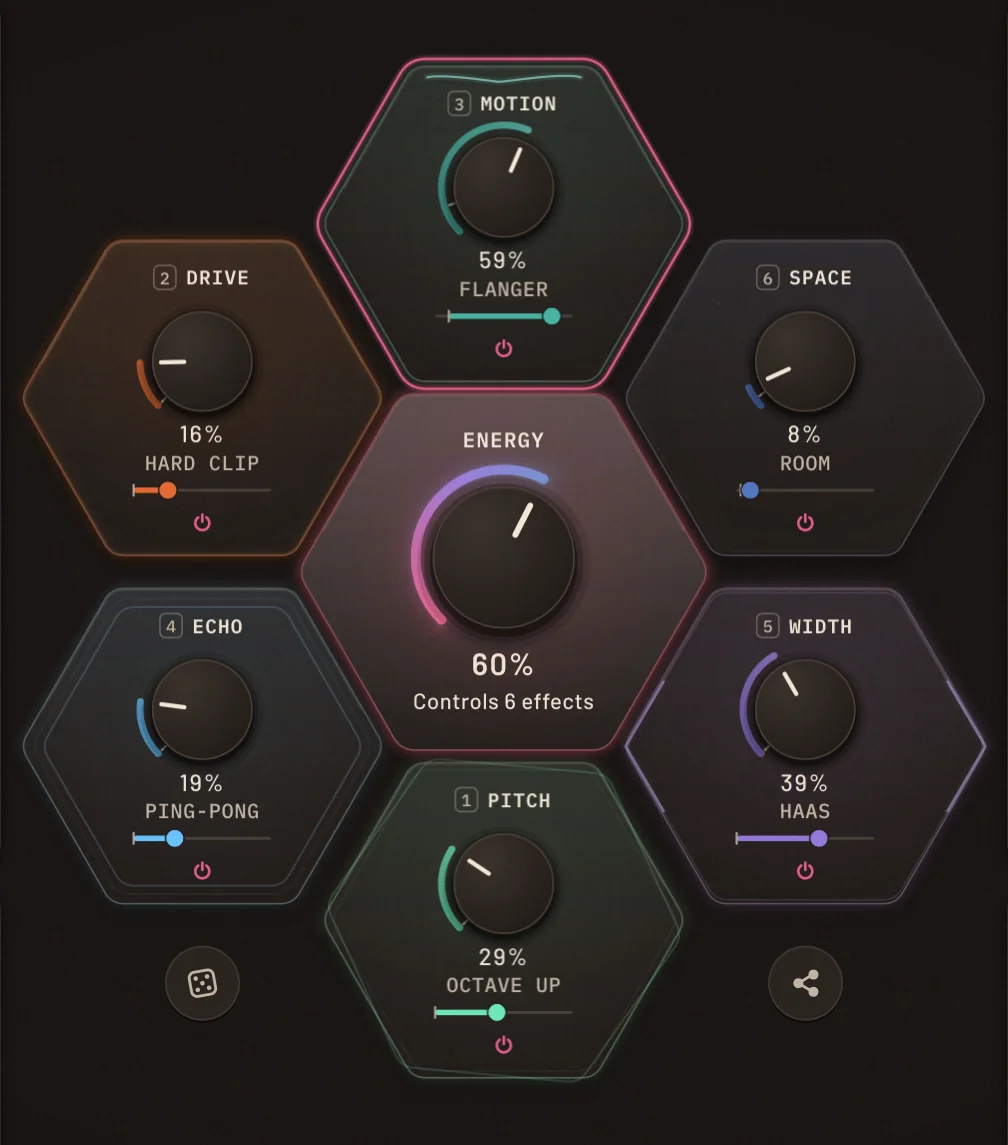
The honeycomb in TWEAK with DRIVE selected and outlined, preset Growl Machine

DRIVE

Saturation, from warm to folded.

Eight types, from Warm and Analog Tube to Hard Clip, plus Tape, Fuzz and Fold in 2.0. Each type names its own knobs. Up to 8× oversampling.

Types
  • Warm
  • Analog Tube
  • Soft Clip
  • Hard Clip
  • Crunch
  • New in 2.0: Tape
  • New in 2.0: Fuzz
  • New in 2.0: Fold

Shown with Growl Machine

More on saturation

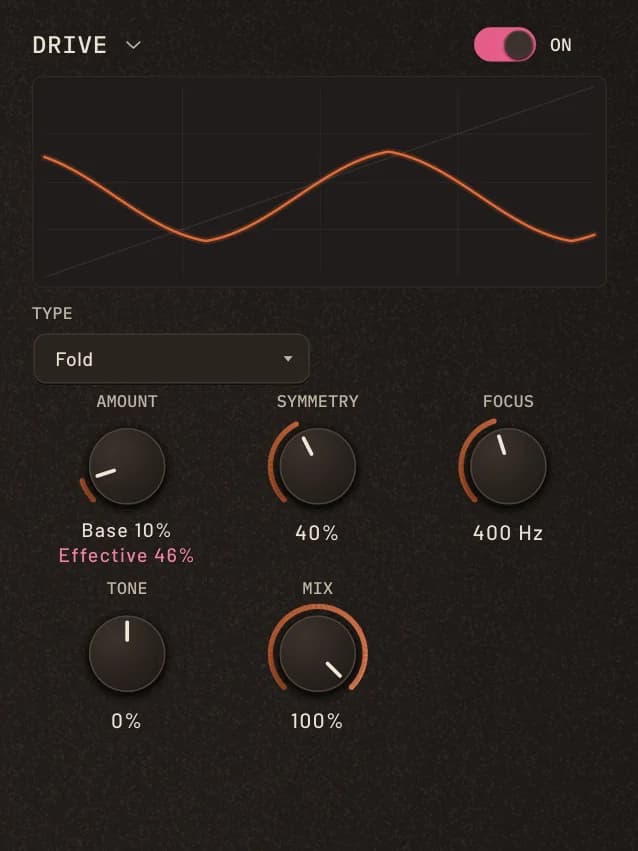
DRIVE editor, on: type Fold; Amount base 10 %, effective 46 %; Symmetry 40 %; Focus 400 Hz; Tone 0 %; Mix 100 %; folding transfer curve
The DRIVE editor in TWEAK, captured from Colony 2.0.

Modulate almost any knob.

Right-click a knob: Modulate with ENERGY, with the LFO or with the Envelope. The knob shows its range as an arc; BUILD → MOD lists all eight routings.

  • LFO

    Seven shapes, from Sine to Sample & Hold and Smooth Random, free or in sync, with retrigger.

  • Envelope

    A full ADSR, gated by TRIGGER, a MIDI note or DROP.

  • Eight routings

    Each with a source, a target and a depth from −100 to +100 %. Every continuous Cell control and DRY/WET.

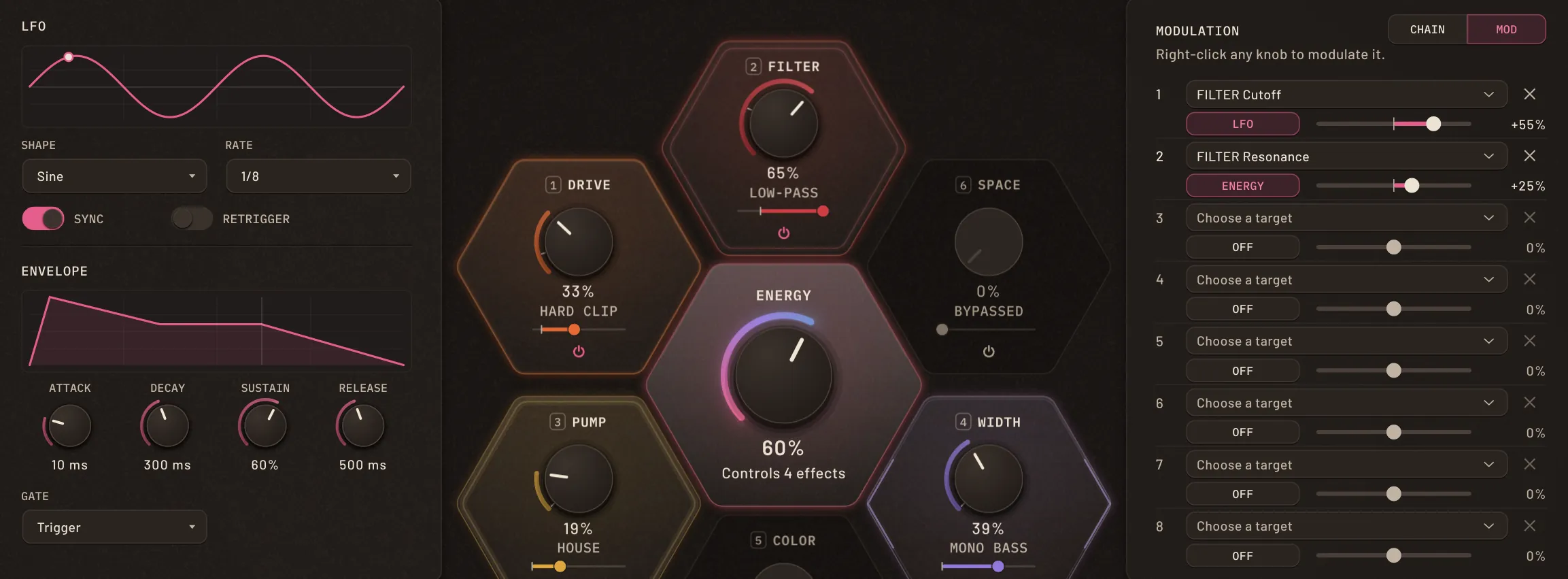
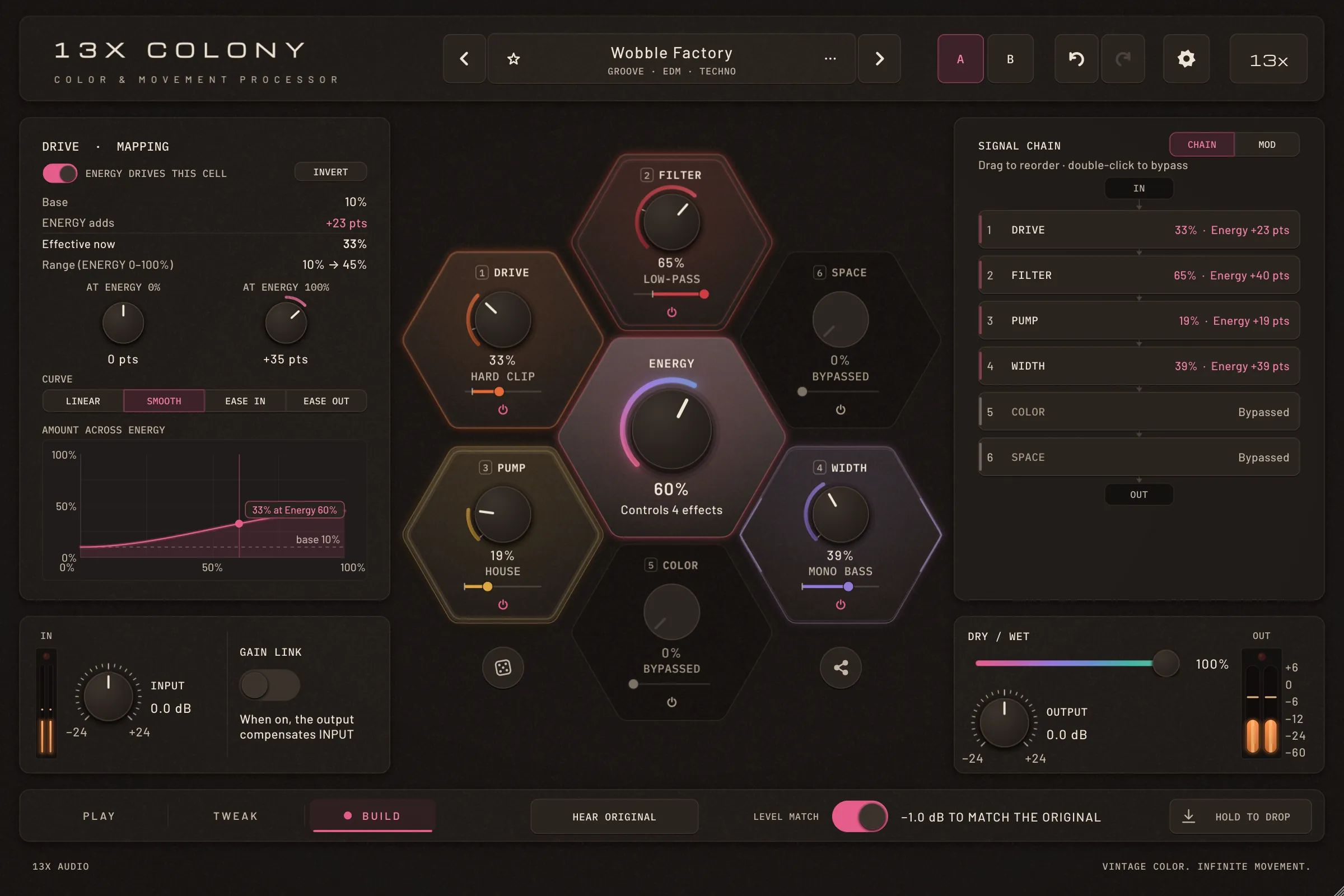
BUILD → MOD with the preset Wobble Factory: the LFO (Sine, 1/8, synced) and the Envelope on the left, eight routings on the right — FILTER Cutoff by the LFO at +55 %, FILTER Resonance by ENERGY at +25 %
BUILD → MOD, captured from Colony 2.0.

Three views. One window.

PLAY for playing, TWEAK for every control, BUILD for how far each Cell travels and what modulates it. The honeycomb stays in the middle in all three.

Choose a view
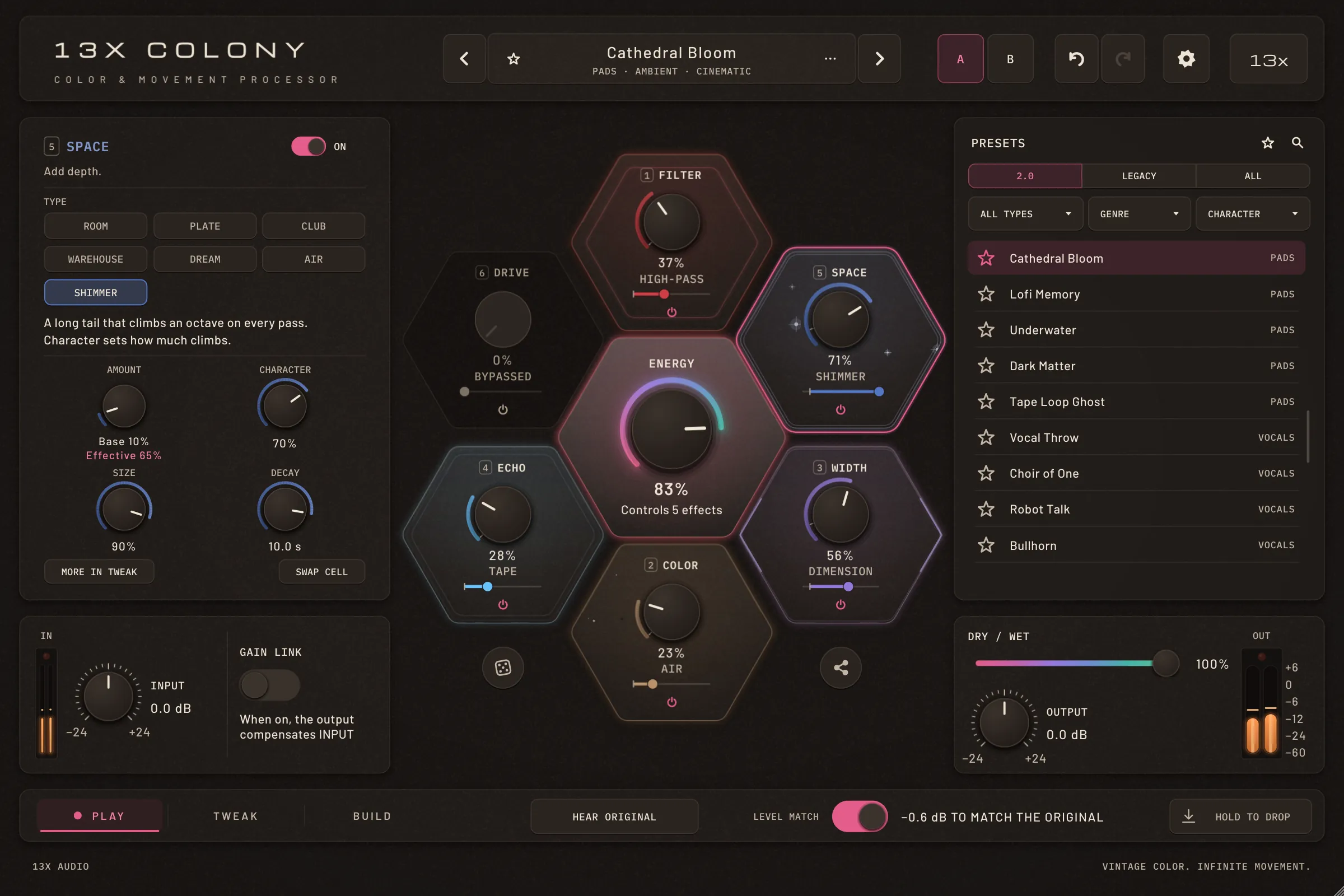
PLAY view with the preset Cathedral Bloom at ENERGY 78 %: SPACE selected with its style Shimmer on the left, the honeycomb in the middle, the preset browser on the right

Pick a preset, turn ENERGY, compare.

The selected Cell's main controls sit beside the honeycomb. Hear Original switches to the latency-aligned input; Level Match, on by default, slowly trims the output toward the input's loudness, which helps reduce loudness bias when you compare.

54 new presets. Each with its own trick.

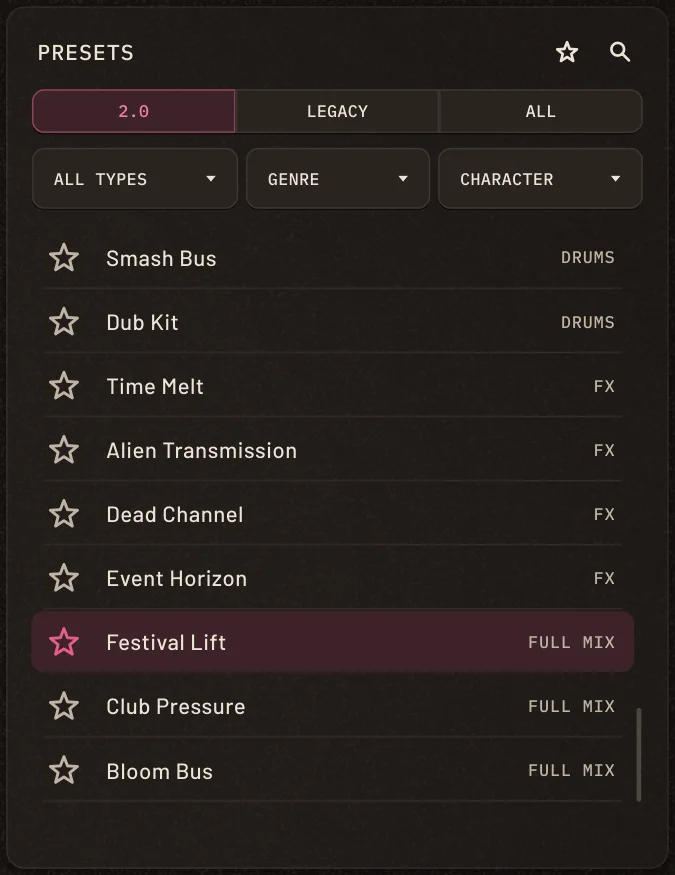
The preset browser on the 2.0 bank: the switch 2.0 | LEGACY | ALL, filters for type, genre and character, Festival Lift loaded

Every one tells a story from ENERGY 0 to 100.

The 2.0 bank starts over: intros that build, drops you play by pulling ENERGY back, plucks that open on every note, a vocal that turns into a choir. No preset repeats another's trick. Filter by type, genre and character, keep favourites, and export or import packs.

Morph Organ and Glass to Steel hold two sounds each: loading them switches to MORPH, and ENERGY glides from one to the other.

All 111 earlier presets are still there, unchanged, under LEGACY; the browser switches between 2.0, LEGACY and ALL.

Build & Drop6
  • RunwayENERGY drains the lows, piles up ping-pong echoes and rolls each second bar into the drop.
  • VacuumENERGY widens and pumps; hold DROP to suck it into a dark vacuum, let go to explode.
  • Tape BrakeENERGY saturates tape and pump; push it past halfway and the tape brakes for one bar.
  • Snare Roll MachineENERGY turns each bar's end into a snare roll that speeds from 1/8 to 1/64 and climbs.
  • Sky LiftENERGY lifts the mix an octave into a climbing shimmer and phaser; drop it to land.
  • RewindENERGY plays every second bar backwards into the next, with dub echoes swelling behind.
Groove5
  • Sidechain HeavenENERGY deepens the pump while every duck swells the reverb, the width and the tape.
  • Wobble FactoryENERGY deepens an eighth-note filter wobble from a gentle sway to a full growl.
  • Gated EuphoriaENERGY cuts a trance gate deeper while Dimension width and the dream tail pulse with it.
  • Random WalkENERGY fades in a sixteenth-note sample-and-hold filter that skips across your groove.
  • Shuffle LiftENERGY swings a straight loop: shuffled pumps, tremolo and echoes, deeper as it rises.
Keys6
  • Velvet RhodesENERGY turns a slow, tape-warm stereo sway into a tempo stutter on the eighths.
  • Late Night PianoENERGY takes a dry, close piano into a shimmering octave bloom that climbs behind it.
  • Morph OrganENERGY morphs a dusty church organ into a fuzzed, phased and pumping rave organ.
  • Dub Chord StationENERGY turns dry stabs into dub techno chords: a moving band and echoes that swell.
  • Bell TowerENERGY rings the keys into bells: ring modulation, an octave above and bright ping-pong.
  • Stab SequencerSteps chop held chords into house stabs; ENERGY opens the filter into full chords.
Plucks6
  • Diamond PluckEvery note snaps a resonant filter open into ping-pong echoes; ENERGY keeps it open.
  • Step SparkleSteps flick an octave on and off into ping-pong echoes; ENERGY fills it into a stack.
  • Rubber PluckENERGY folds plucks into rubber and rings them through a comb that boings on the eighths.
  • Crystal CascadeENERGY lets every pluck cascade in echoes that climb into an octave shimmer.
  • Resonant MalletsENERGY rings every pluck through resonators in A, from a soft tick to a marimba glow.
  • Pixel HarpENERGY crushes plucks to 8-bit and repeats the last beat of each bar as a pixel harp.
Leads5
  • Supersaw SpreadENERGY stacks a single lead into a detuned, Dimension-wide supersaw wall.
  • ScreamerENERGY pushes a lead into octave fuzz that talks through an LFO vowel and throws echoes.
  • Jet LaserENERGY sweeps a lead through a screaming flanger, an octave above, Haas-wide.
  • Glass to SteelENERGY morphs a breathy glass flute lead into a hard, band-passed steel lead.
  • Chip HeroENERGY crunches a lead to 8 bits, adds a fifth and chops it into a chiptune hook.
Pads5
  • Cathedral BloomThe louder you play, the higher the shimmer climbs; ENERGY sets how far it blooms.
  • Lofi MemoryENERGY brings an old, warbling radio memory into focus until it is clear and wide.
  • UnderwaterENERGY sinks the sound underwater: darker, phasing, drifting currents and a deep hall.
  • Dark MatterENERGY drags a pad an octave down into dark tape saturation and an endless hall.
  • Tape Loop GhostENERGY wears a pad into a decaying tape loop: longer repeats, wow, dust and dark.
Vocals5
  • Vocal ThrowTRIGGER throws the last word into ping-pong echoes; ENERGY makes the throws longer.
  • Choir of OneENERGY grows one voice into a choir: a fifth above, Dimension voices and a dream hall.
  • Robot TalkENERGY turns a voice into a robot: ring-modulated, comb-tuned, its formants hopping.
  • BullhornENERGY squeezes a vocal into a gritty megaphone with a slap echo for the hook.
  • Chop ShopENERGY flips the end of every half bar backwards and doubles the vocal an octave up.
Bass4
  • Growl MachineENERGY folds the bass into a growl that talks through vowels on the eighths.
  • Sub WeightENERGY adds a sub octave and tape weight underneath while the top stays clean.
  • Mono PunchENERGY tightens a bass into mono, ducking, punching club weight under the kick.
  • Reese EngineENERGY detunes the bass into a phasing Reese that rolls over a mono sub.
Drums5
  • Breakbeat ChaosEach bar rolls the dice for stutter, crush and smash; ENERGY raises how wild it gets.
  • Punch RoomENERGY slams the hits and opens a big plate that is gated shut after every beat.
  • Hi-Hat HaloENERGY makes hats sparkle: an octave of shine, swung panning and ping-pong sixteenths.
  • Smash BusENERGY blends in a crushed, crunching parallel copy until the kit hits like a wall.
  • Dub KitENERGY throws dub echoes off every snare and lets them bloom in the gaps of the beat.
FX4
  • Time MeltENERGY lets time melt: the tape sags every second bar, the pitch drifts, echoes smear.
  • Alien TransmissionSteps scramble a ring-modulated, comb-tuned signal; ENERGY tunes the aliens in.
  • Dead ChannelENERGY breaks the signal: a narrowing radio band, static and drop-outs that retune.
  • Event HorizonENERGY pulls everything into a dub vortex: echoes that feed back, flange and fall.
Full Mix3
  • Festival LiftENERGY lifts a mix from dark and narrow to bright, wide and glued, at the same level.
  • Club PressureENERGY presses a mix into the club: grabby glue, a kick-locked pump, a mono low end.
  • Bloom BusA gentle glue whose space and width bloom when the mix gets loud; ENERGY sets how much.

Community presets

More sounds for COLONY.

Free presets from 13x Audio and other COLONY users, each with its own page. Share yours.

Browse presets →

Specifications

Status
2.0 out now · free, a free update for 1.x
Formats
VST3 · AU (macOS) · CLAP · LV2 (Linux) · Standalone
Platforms
macOS · Windows · Linux
Cells
DRIVE · MOTION · SPACE · PUMP · WIDTH · COLOR · GLITCH · ECHO · PUNCH · PITCH · FILTER, six at a time, + ENERGY
ENERGY
Manual · Loop · Trigger · Follow · Steps · MAP | MORPH · SWARM · HOLD TO DROP
Modulation
8 routings · ENERGY, LFO (7 shapes), Envelope (ADSR)
Sidechain
Stereo input for PUMP's kick trigger and ENERGY Follow
MIDI
MIDI learn by right-click · the Envelope opens on MIDI notes
Presets
54 in the 2.0 bank · 111 Legacy presets
Parameters
222 · 148 automatable
Latency
75 samples at 48 kHz (default 2× oversampling) · 1×–8× oversampling

Download COLONY

Free for macOS, Windows and Linux. Every build passed our tests and plug-in validation. Installing 2.0 over 1.x keeps your projects and presets.

Version 2.0.0 · free · no account, no license key

macOS

macOS 11 or later · Apple silicon and Intel

VST3, Audio Unit and a standalone app

Download for macOS

Colony-2.0.0-macOS.zip · 64 MB

Copy Colony.vst3 to /Library/Audio/Plug-Ins/VST3, Colony.component to …/Components and Colony.clap to …/CLAP.

SHA-2562974b70c391b715e58705ea3f82cf15eae453781d6ec903c943110b8de4c38fb
Windows

Windows 10 or 11, 64-bit

VST3 and a standalone app

Download for Windows

Colony-2.0.0-Windows.zip · 33 MB

Copy the Colony.vst3 folder to C:\Program Files\Common Files\VST3 and Colony.clap to …\CLAP. If SmartScreen asks about the standalone app: More info › Run anyway.

SHA-25695a743e45a4d7cbb4368693bdf1b994a863795b988056c603be4fc761af27880

Linux

x86_64 with glibc 2.35 or later: Ubuntu 22.04, Debian 12, Fedora 36 and newer

VST3 and a standalone app

Download for Linux

Colony-2.0.0-Linux.tar.gz · 38 MB

Run sh install.sh: VST3, CLAP and LV2 go to ~/.vst3, ~/.clap and ~/.lv2. The standalone app runs from the folder.

SHA-256bd1de51bbf7fd48b068809adb968b5ec40887842b0d4a52dbd0a4ad019f47782

What you're installing
  • No account
  • No installer bloat
  • Works offline · no activation · no network access
  • SHA-256 checksum for every build
  • Notarized by Apple (macOS)
Windows warns about the download?

SmartScreen, Defender and the download checks in Chrome and Edge rate a file partly by its publisher's reputation. A small developer without a paid code-signing certificate and a long download history starts with none, so a new, unsigned plugin gets flagged even when nothing is wrong with the file. Our Windows builds aren't code-signed yet. It's a reputation warning, not a malware finding.

Check the file instead: in PowerShell, run certutil -hashfile <file> SHA256 and compare the result with the checksum listed above.

Install paths, keeping the file, the manual download: download help →

Questions? support@13x.audio

Tested in
  • FL Studio
  • Ableton Live
  • REAPER
  • Logic Pro

Also free: AURORA, our dynamic EQ. See AURORA

What's new

Every version, in the open
  • 2.0.024 Oct 2026
    • Five new Cells — GLITCH, ECHO, PUNCH, PITCH, FILTER — and any Cell in any place
    • ENERGY Follow and Steps, MORPH, SWARM, HOLD TO DROP and modulation on almost any knob
    • 54 new presets in the 2.0 bank; CLAP, and LV2 on Linux
    Full release notes

    COLONY 2.0 is a free update. The hive has eleven Cells now, any Cell can sit in any of the six places, ENERGY has new sources, and almost every knob can move on its own. It comes with a new preset bank, and your 1.x sessions and presets still open and sound the same.

    • Five new Cells: GLITCH (Tape Stop, Stutter, Reverse, Buffer Repeat, Gate, all on the host grid), ECHO (Digital, Tape, Ping-Pong, Dub, synced, with ducking), PUNCH (Transient, Glue, Smash), PITCH (Shift up to ±12 semitones, Octave Up, Octave Down, Fifth, Detune, no latency) and FILTER (Low-Pass, High-Pass, Band-Pass, Notch and a Resonator tuned to a key).
    • Any Cell in any place: right-click a Cell or press SWAP CELL in PLAY. Swaps never click, are one undo step and can be automated.
    • New types: DRIVE Tape, Fuzz and Fold with up to 8x oversampling; COLOR Telephone, Vowel and Comb; MOTION Phaser, Flanger and Ring; WIDTH Haas, Dimension and Mono Bass; SPACE Shimmer, a reverb that climbs in octaves.
    • ENERGY Follow: the level of your track, or of the sidechain, moves ENERGY.
    • ENERGY Steps: a 16-step sequence on the host's bars, with Glide and patterns. Loop has new shapes too: Build, Square and Random.
    • MORPH: ENERGY 0 plays sound A, ENERGY 100 plays sound B, and every knob glides between them.
    • SWARM: the rhythmic Cell (PUMP, MOTION or GLITCH) pushes the ENERGY of all the others, so reverb and width breathe with the groove.
    • HOLD TO DROP: hold it and a high-pass with a noise riser builds over 1, 2 or 4 bars; let go and ENERGY slams to 100 % and falls back over a bar. It can be automated and learned over MIDI.
    • Modulation: ENERGY, an LFO (seven shapes, free or synced) or an envelope (ADSR, gated by a trigger, a MIDI note or DROP) on almost any continuous knob, through eight routings. Right-click a knob to add one; BUILD › MOD lists them all.
    • 54 new presets: the 2.0 bank, from Build & Drop and Groove to Keys, Plucks, Leads, Pads, Vocals, Bass, Drums, FX and Full Mix. Each tells a story from ENERGY 0 to 100. Two of them are MORPH presets with two sounds.
    • Legacy bank: every earlier preset is still there, unchanged. The browser switches between 2.0, LEGACY and ALL.
    • The dice and Colony Codes: roll a whole new Colony (locked Cells stay), or copy a sound as a short line of text and paste it into any COLONY 2.
    • New formats: CLAP, and LV2 on Linux, next to VST3, AU and the standalone app. MIDI learn is on by default.
    • New look: warm and dark, with Cell animations, numbered places, tooltips on every control and a UI from 90 to 200 %.
    • New manual: everything above, in the download as Colony Manual.pdf.

    System requirements: macOS 11 or later, Apple silicon and Intel (VST3, AU, CLAP, Standalone; signed and notarized). Windows 10 or later, 64-bit (VST3, CLAP, Standalone). Linux x86-64 with glibc 2.35 or later (VST3, CLAP, LV2, Standalone).

    Install by replacing the old files with the new ones (INSTALL.txt in the download).

  • 1.0.013 Oct 2026
    • Free for macOS, Windows and Linux
    • Installs over the 0.9 beta: projects, presets and settings carry over
    • Every package includes the manual
    Full release notes

    COLONY 1.0.0 — free for macOS, Windows and Linux.

    Six effects (DRIVE, MOTION, SPACE, PUMP, WIDTH, COLOR) around one ENERGY knob, PLAY / TWEAK / BUILD, 73 factory presets (22 Signature), HEAR ORIGINAL with Level Match, PUMP on the host grid or your kick. Every package includes the manual (Colony Manual.pdf).

    Coming from the public beta (0.9.0 Beta)? Install over it: projects, presets and settings carry over. The Windows standalone app is not code-signed (SmartScreen asks once). Feedback: support@13x.audio.

  • 0.9.011 Oct 2026Beta
    • The first public build, for macOS, Windows and Linux
    • Six effects, PLAY / TWEAK / BUILD and 73 factory presets
    • HEAR ORIGINAL with Level Match; PUMP on the host grid or your kick
    Full release notes

    COLONY 0.9.0 Beta — the first public build, for macOS, Windows and Linux.

    Six effects (DRIVE, MOTION, SPACE, PUMP, WIDTH, COLOR) around one ENERGY knob, PLAY / TWEAK / BUILD, 73 factory presets (22 Signature), HEAR ORIGINAL with Level Match, PUMP on the host grid or your kick. Every package includes the manual (Colony Manual.pdf).

    Beta notes: the Windows standalone app is not code-signed (SmartScreen asks once); MIDI learn is not in this build. Feedback: support@13x.audio — with your DAW, system and the version line from Settings › ABOUT.

MOI's editor: seven module displays above seven large knobs, from TUNE to SPACE
Next free plugin

MOI — a free vocal chain.

Tuning, compression, saturation, air, doubles, echo and reverb on one MAGNITUDE knob. Hear it on its page.

Join the waitlist →

Questions

Is Colony 2.0 free?

Yes. COLONY is free, like AURORA — no account, no license key, no catch. 2.0 is a free update for everyone on 1.x.

Do my 1.x projects and presets still work?

Yes. Install 2.0 over 1.x: sessions open as they were, and all 111 earlier factory presets are still there, unchanged, under LEGACY in the browser.

Which systems and formats?

macOS, Windows and Linux, as VST3, CLAP and Standalone, plus AU on macOS and LV2 on Linux.

Do I need to give my email?

No. The download needs no email and no account. If you like, leave your address after the download to hear about new free plugins and COLONY updates — nothing else, and every email has a link to leave.

What does Level Match do?

It is on by default and slowly trims Colony's output toward the loudness of the incoming signal — gated, weighted RMS over about two seconds, at most ±12 dB, before Safe Output — which helps reduce loudness bias in comparisons. OUTPUT comes after the match, so it stays exactly where you set it. It is not an integrated LUFS measurement.

How is ENERGY different from a mix knob?

Mix blends the processed and the original signal. ENERGY moves each Cell along its own range — some up, some down — as set in BUILD, and in 2.0 it can also modulate almost any knob. Dry / Wet is a separate control.

Can I control Colony from a MIDI controller?

Yes. Right-click a control and choose MIDI learn; HOLD TO DROP has it in its own menu. The Envelope can also open on MIDI notes, so a key press can throw an echo.

How is Colony different from RC-20 Retro Color?

Both add vintage character: drive, wow, vinyl crackle, bitcrush and space. RC-20 is built around shaping that texture in detail. Colony is built around movement: filter sweeps, pumping, stutters, echoes and width sit next to the color effects, and ENERGY moves all of them together, so a loop can go from subtle warmth to a full build in one gesture. And Colony is free. RC-20 Retro Color is a trademark of XLN Audio. 13x Audio is not affiliated with XLN Audio.

Weighing COLONY against RC-20 Retro Color and other free options? Free RC-20 alternatives, compared →

Home