


New · free
COLONY is out.
Our second free plugin: six effects for vintage color and movement on drums, keys, bass and loops. For macOS, Windows and Linux.
Get COLONY →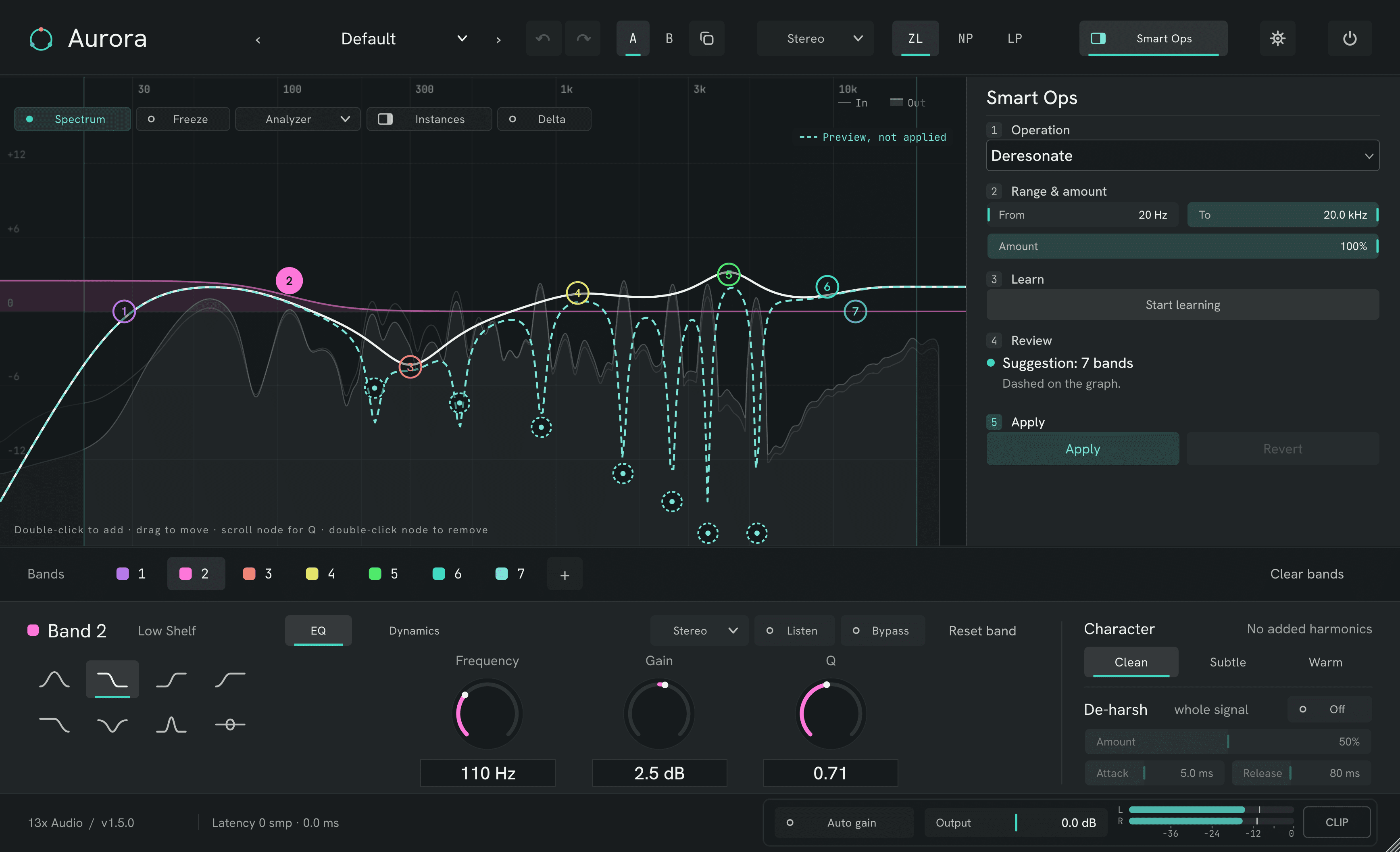
Up to 24 bands on a live spectrum. Smart Ops previews every move on the curve before it touches your mix, and Revert never takes your own edits with it.
Other platforms & install notes
10,000+ downloads · Featured on Bedroom Producers Blog · Listed on KVR Audio
The curve, Smart Ops and the dynamic engine in motion. Recorded with Aurora 1.4 — the screenshots on this page show 1.5. Sound on.
Plays from YouTube (privacy-enhanced mode) once you press play — until then nothing loads from YouTube.
Rendered from the plugin itself, state by state. Pick a flow and step through it.
Louder always sounds better. Aurora takes that out of the decision.
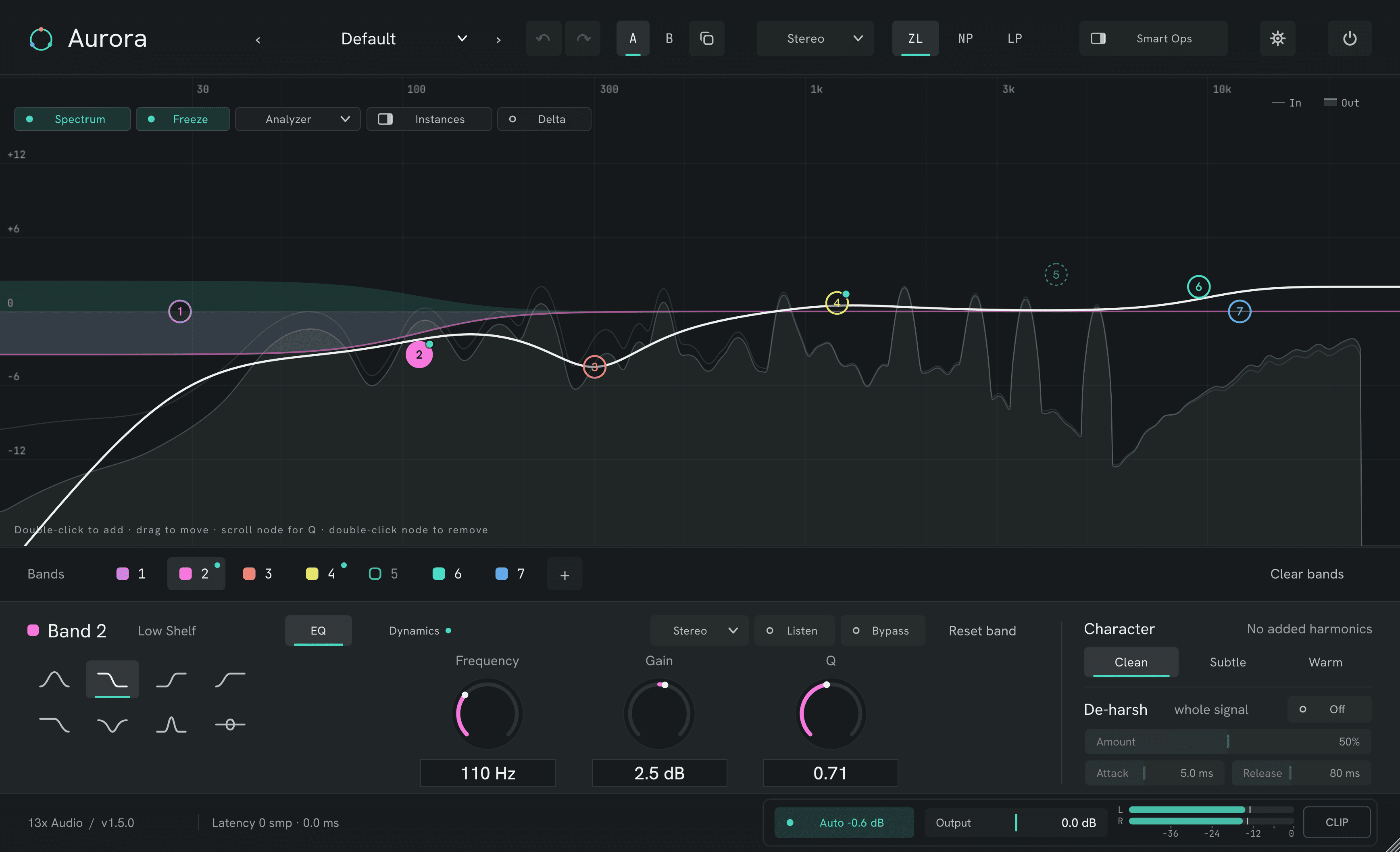
Two settings side by side, copy one to the other, and step back and forth through every edit.
Hear only what the EQ changes: the output minus the latency-aligned original.
Solo one band's region, or take one band out, without touching the rest.
Bypass, A/B and presets compare at equal loudness, so the better setting wins — not the louder one.
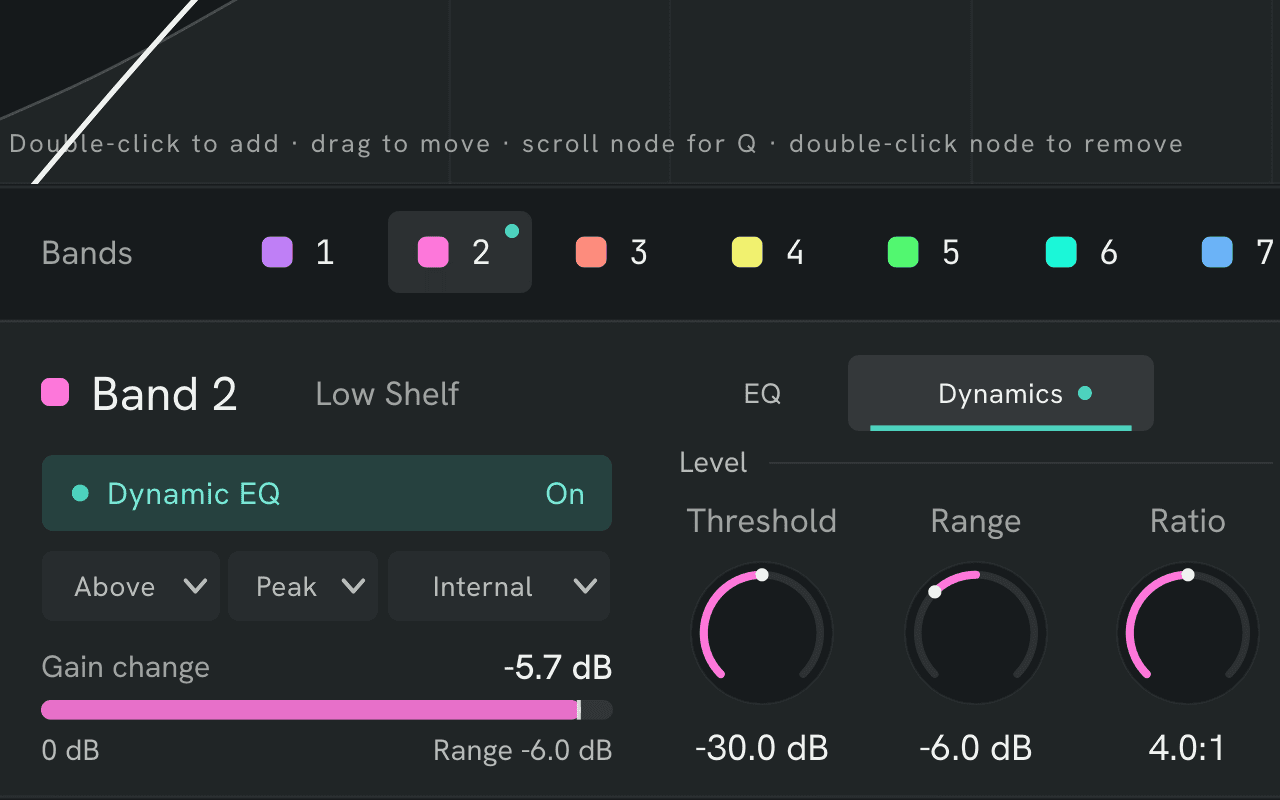
Tame a resonant snare only on the hits: threshold, range, ratio and timing per band, with its live gain change in view.
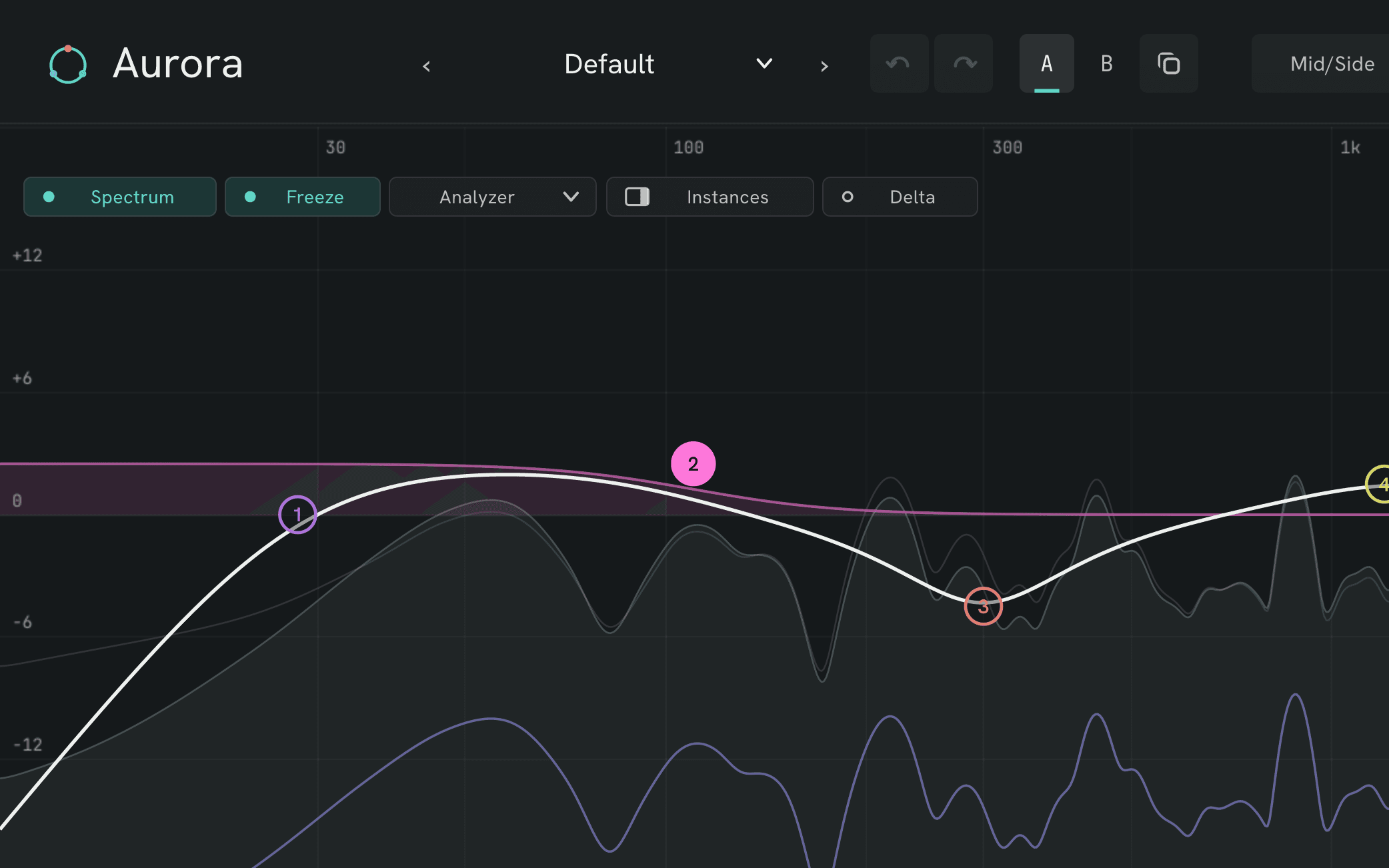
Clean up the sides without touching a mono kick: the analyzer splits into mid and side, and any band can sit on either.
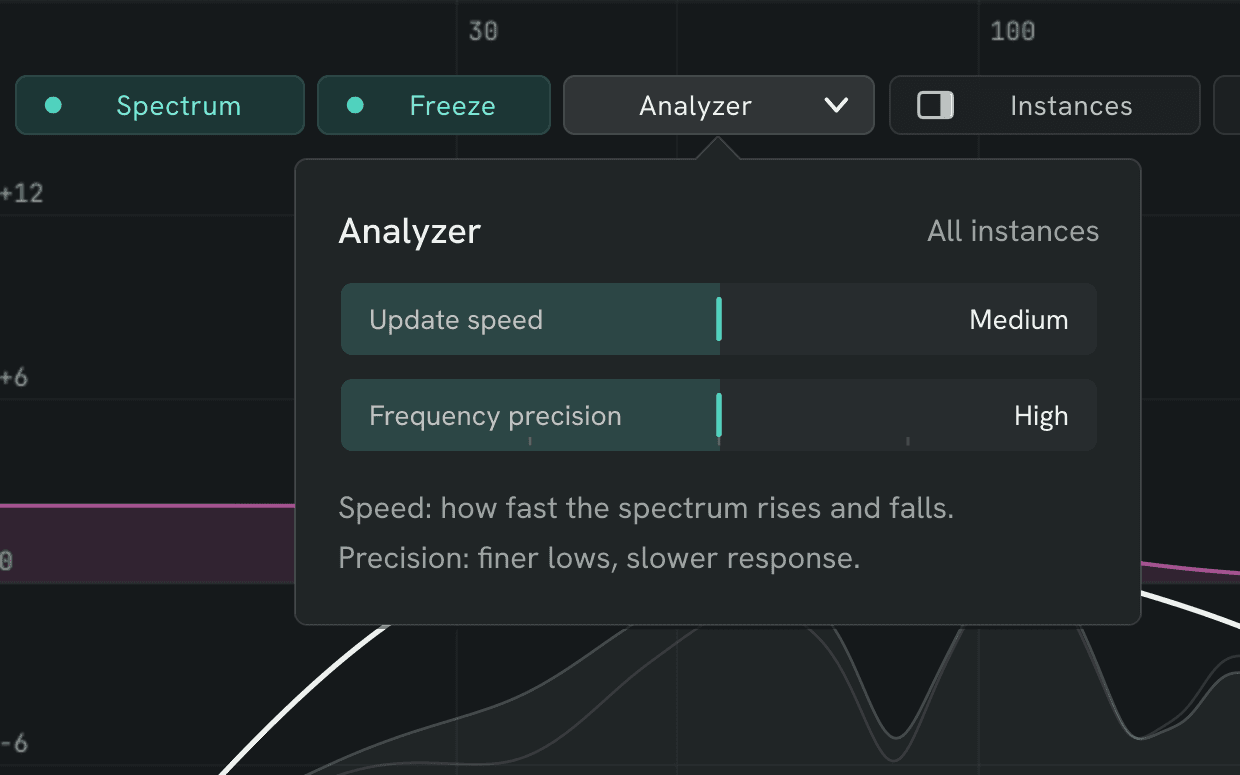
See the low end in detail: frequency precision up to an 8192-point FFT, at the update speed you choose.
There is no paid tier, no unlock, no upsell inside AURORA. What you download is the shipping build with every feature switched on — the same file we use ourselves.
No account · works offline · SHA-256 published for every build
User manualPDF · 41 pages ↗SmartScreen, Defender and the download checks in Chrome and Edge rate a file partly by its publisher's reputation. A small developer without a paid code-signing certificate and a long download history starts with none, so a new, unsigned plugin gets flagged even when nothing is wrong with the file. Our Windows builds aren't code-signed yet. It's a reputation warning, not a malware finding.
Check the file instead: in PowerShell, run certutil -hashfile <file> SHA256 and compare the result with the checksum listed above.
Install paths, keeping the file, the manual download: download help →
Questions? support@13x.audio
Our second free plugin: six effects for vintage color and movement on drums, keys, bass and loops. For macOS, Windows and Linux.
Get COLONY →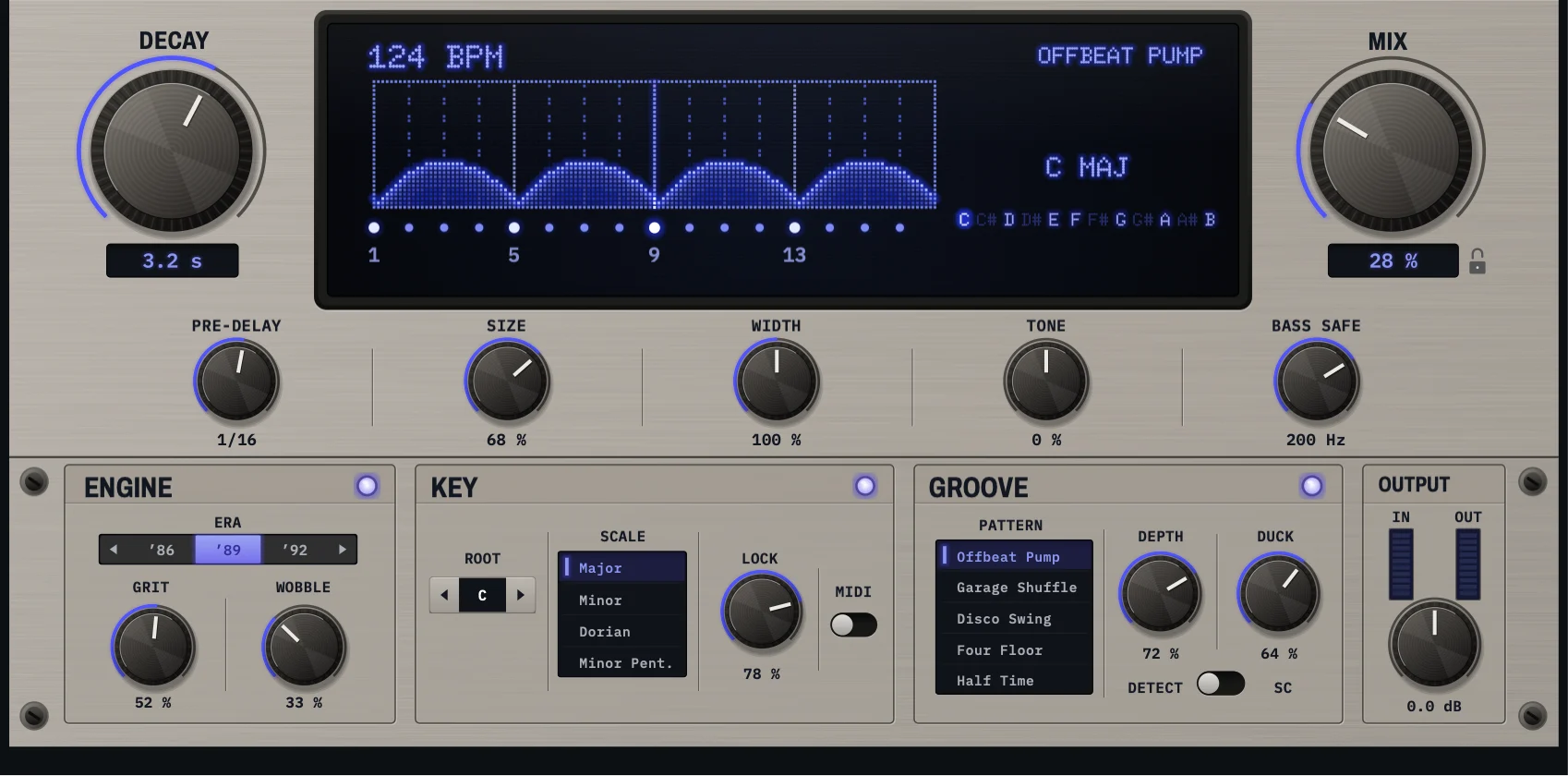
A tail that keeps time with your groove, stays in key and ducks for every kick, through the converters of three digital eras. VST3 and AU.
An urgent fix, thanks to a user who sent a screen recording. Please update.
All of these now fade over to the new setting. Switching a band on or off fades too.
Good to know: Some changes take effect a moment after you make them, because Aurora lets the new setting settle before it fades it in. That is usually a few hundredths of a second, and up to about a second for a Brickwall cut at a very low frequency.
Your sound doesn't change: with settings that stay as they are, Aurora 1.6.1 sounds exactly like 1.6.0. Projects and presets load unchanged.
New to 1.6? See what's new: https://13x.audio/products/aurora/1.6
macOS: universal VST3, AU and CLAP, Developer ID signed and Apple notarized. Windows: 64-bit VST3 and CLAP in a zip, with Install Aurora.cmd. Linux: x86_64 VST3, CLAP and LV2 in a .tar.gz with a per-user install script; glibc 2.35 or later.
Fixes and features from your feedback. Thank you!
Screenshots and short how-tos for every new feature: [What's new in 1.6](https://13x.audio/products/aurora/1.6).
Your sound doesn't change: 1.5.1 projects and presets load and play back identically.
Manual install note: the files are now named 13x Aurora.vst3, 13x Aurora.component (macOS), 13x Aurora.clap and 13x-aurora.lv2 (Linux). If you copy them by hand, delete the old 13x Audio Aurora.vst3 / .component / .clap / .lv2. Ours are the ones whose bundle ID is audio.13x.aurora; leave iZotope's Aurora alone.
macOS: universal VST3, AU and CLAP, Developer ID signed and Apple notarized. Windows: 64-bit VST3 and CLAP in a zip, with Install Aurora.cmd. Linux: x86_64 VST3, CLAP and LV2 in a .tar.gz with a per-user install script; glibc 2.35 or later.
Two workflow features from user feedback. Thank you!
Your sound doesn't change: 1.5 projects and presets load and play back identically. Close your DAW, replace the old plugin files with the new ones, then rescan your plugins.
macOS: universal VST3, AU and CLAP, Developer ID signed and Apple notarized. Windows: 64-bit VST3 and CLAP in a zip. Linux: x86_64 VST3, CLAP and LV2 in a .tar.gz with a per-user install script; glibc 2.35 or later.
Aurora 1.5 turns Smart Ops into a guided workflow you can always take back, brings every Aurora in your project into one window, and makes comparisons fair.
Existing projects, presets and automation load unchanged; new parameters are off by default, so older sessions sound the same. Close your DAW, replace the old plugin files with the new ones, then rescan your plugins.
macOS: universal VST3, AU and CLAP, Developer ID signed and Apple notarized. Windows: 64-bit VST3 and CLAP in a zip. Linux: x86_64 VST3, CLAP and LV2 in a .tar.gz with a per-user install script; glibc 2.35 or later.
Aurora 1.4 refines the workspace, restores the intended Mac compatibility and makes Smart Ops Learn follow the audio your host actually sends.
Existing projects, presets and automation load without migration. Parameter identifiers and ranges stay the same. Close your DAW, replace the old plugin files with the new ones, then rescan your plugins.
macOS: universal VST3, AU and CLAP, Developer ID signed and Apple notarized. Windows: 64-bit VST3 and CLAP in a zip. Linux: x86_64 VST3, CLAP and LV2 in a .tar.gz with a per-user install script; glibc 2.35 or later.
This release makes Aurora faster to work with and more dependable inside the host, while keeping the 1.3 matte interface and parameter map intact.
Existing projects, presets and automation load without migration. Subtle and Warm intentionally use the new, gentler voicings.
macOS ships as a universal Apple Silicon + Intel build with VST3, AU and CLAP, signed and notarized by Apple.
The interface has been rebuilt from the ground up since 1.0 — this build brings Windows fully up to date with the current design:
No changes to sound, parameters or sessions — existing projects load unchanged; hosts show the new window size on next open.
Ships as a plain zip: unzip, then drop Aurora.vst3 into your VST3 folder (Aurora.clap into CLAP). No installer, no SmartScreen warning.
Layout refinements to the matte rebuild, straight from user feedback:
No changes to sound, parameters or sessions — existing projects load unchanged. The window is more compact; hosts will show the new size on next open.
This is the interface Aurora was meant to have — implemented 1:1 from our final design master, replacing yesterday's interim look:
Kept from 1.2.0: the band-delete Restore chip, centre-detent bipolar knobs (Gain/Output/Range), the documented gestures, and the readability contrast floor.
No changes to sound, parameters or sessions — existing projects load unchanged.
One interface, rebuilt 1:1 from our original design master. The three-theme experiment is over — Aurora now ships a single, definitive look: the glass-bead band nodes, the glowing response curve, the gradient wordmark, the full aurora stage. Every 1.1 feature (per-band dynamics, De-Harsh, Smart Ops, Listen, placement) redrawn in that language.
New — and honest:
No changes to sound, parameters or sessions — existing projects load unchanged. Note: the plugin window proportions changed with the redesign; hosts will show the new size on next open.
Three UI themes — "Pro" is the new default.
Switch anytime: More from 13x → Theme (bottom-left of the plugin). Your choice is remembered across sessions and applies to all open instances.
No changes to sound, parameters or sessions — existing projects load unchanged.
Three UI themes — "Pro" is the new default.
Switch anytime: More from 13x → Theme (bottom-left of the plugin). Your choice is remembered across sessions and applies to all open instances.
No changes to sound, parameters or sessions — existing projects load unchanged.
AURORA 1.0 — Windows (VST3 + CLAP)
The 1.0 public launch. A free, studio-grade dynamic parametric EQ — no license key, no account, works offline.
Ships as a plain zip: unzip, then drop Aurora.vst3 into your VST3 folder (Aurora.clap into CLAP). No installer, no SmartScreen warning.
Aurora 1.0.0 — first public release.
A free 24-band dynamic EQ: every filter shape to 96 dB/oct + brickwall, dynamic EQ on every band with external sidechain, three phase modes (zero-latency, decramped Natural, true linear phase), spectral De-Harsh, Mid/Side & L/R per band, and one-click Smart Ops (Match, De-Ess, Auto-Pocket, Deresonate, Mono-Safety).
macOS: universal (Apple Silicon + Intel), signed and notarized. Ships as VST3, AU (Logic), and CLAP — copy the bundle your DAW uses, no installer.
AURORA 0.2.2 - Windows (VST3 + CLAP)
AURORA 0.2.1 - Windows (VST3 + CLAP + Standalone)
AURORA 0.2.0 - Windows release.
AURORA 0.1.0 - first public Windows release.
Yes — the full plugin, no license key, no account, no trial limit and no feature gates. It is not a lite edition of a paid product and there is nothing to unlock inside it.
Windows: VST3 / CLAP — Windows 10/11; x86_64 · macOS: VST3 / AU / CLAP — macOS 11+; Apple Silicon & Intel (universal) · Linux: VST3 / CLAP / LV2 — Linux · glibc 2.35+; x86_64
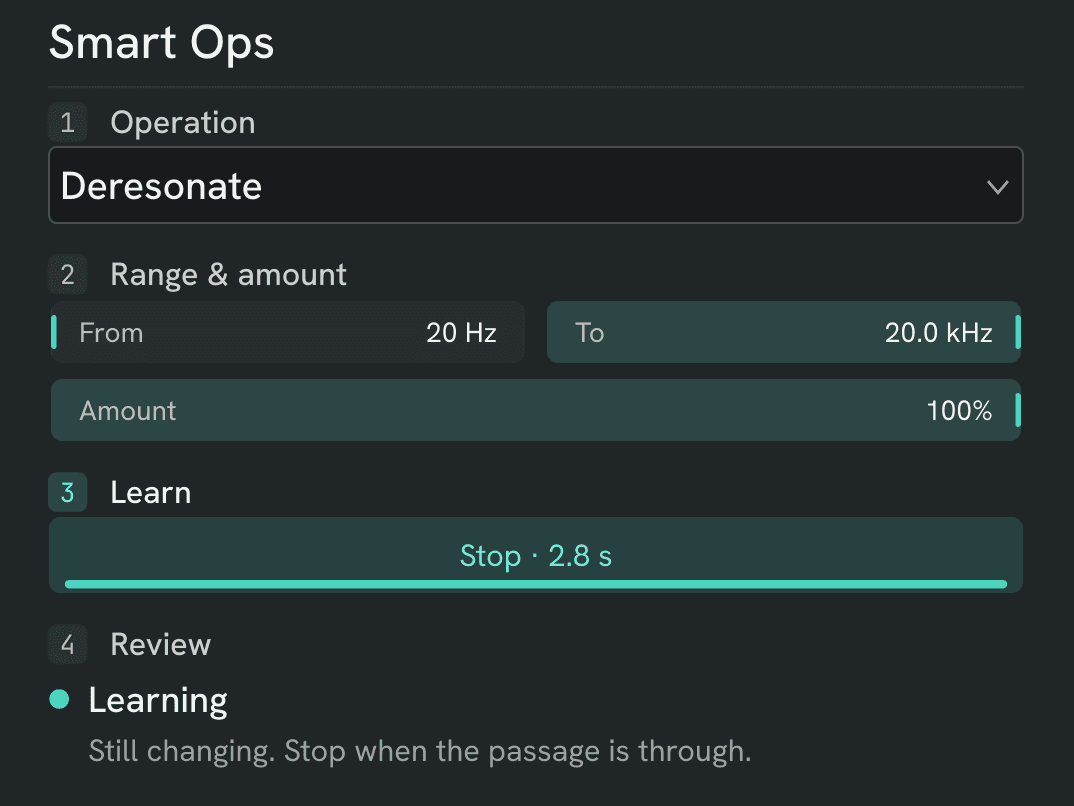
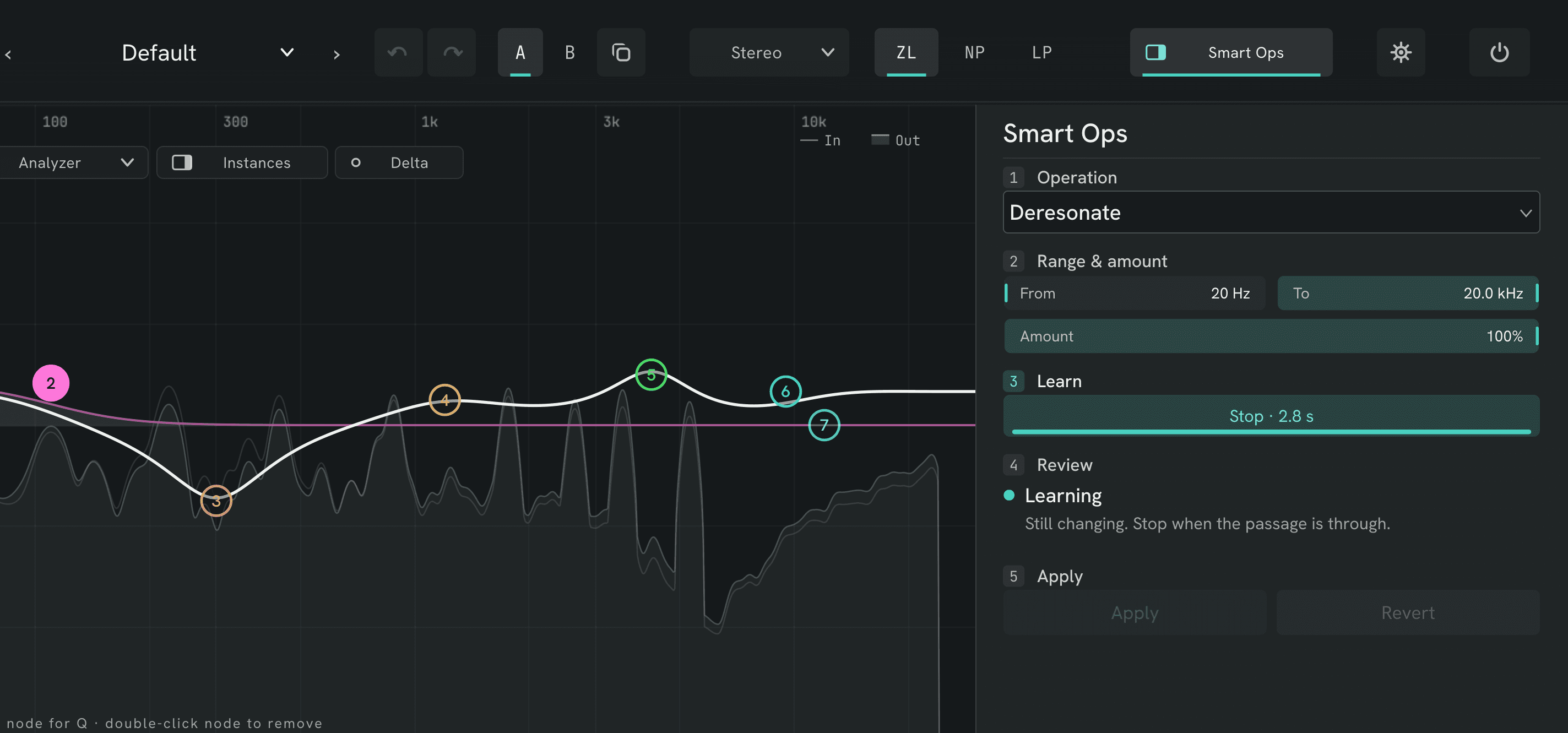
It matches a reference curve, hunts and tames resonances, de-esses, brackets with high and low cuts, and unmasks one track against another. You pick the job, let it listen while you play, and see the suggestion dashed on the curve before it applies. It writes real bands, so every move stays fully editable — and Revert takes back only what it changed.
None in zero-latency mode or in the analog-matched Natural mode. True linear-phase mode reports its delay compensation to the host, so everything in your session stays in sync.
There isn't one on AURORA. It exists so you can judge whether 13x builds serious software before anyone asks you for money — the paid products come later, and this one stays free either way.
It covers much of the same ground — a live spectrum, up to 24 dynamic bands, mid/side and linear phase — plus the Smart Ops assistant, for free. Pro-Q is the more mature product today; AURORA runs on Windows, macOS and Linux, which is one platform more.
All of them. AURORA is a mixing and mastering EQ: vocals, drums, guitars, orchestral stems, a hip-hop 2-bus or a techno master all get the same 24 bands, dynamics and Smart Ops.
No. The download button is a direct link. There is an optional email path if you'd rather have the link sent to a studio machine, and an optional release-news sign-up — both are opt-in, neither is required.
Yes. There is no license server and no activation. AURORA works offline — it only checks 13x.audio for updates — and will keep opening your sessions whatever happens to us.
The macOS build is signed with an Apple Developer ID and notarized by Apple, and every build passes pluginval at strictness 10 before it is published. Each build's SHA-256 is listed in the download panel under Checksums — hash the file you received and compare. On Windows, Chrome and Edge may show a new-publisher reputation warning; AURORA is not yet code-signed there, and the checksum is how you verify it regardless.
Download AURORA and decide in five minutes whether it belongs in your chain. Nothing to cancel if it doesn't.