AURORA ist kostenlos — kein Konto, kein Lizenzschlüssel, keine Testphase.
Jetzt verfügbar · Gratis-Download
AURORADynamischer parametrischer EQ

Sieh den Klang.
Form das Spektrum.

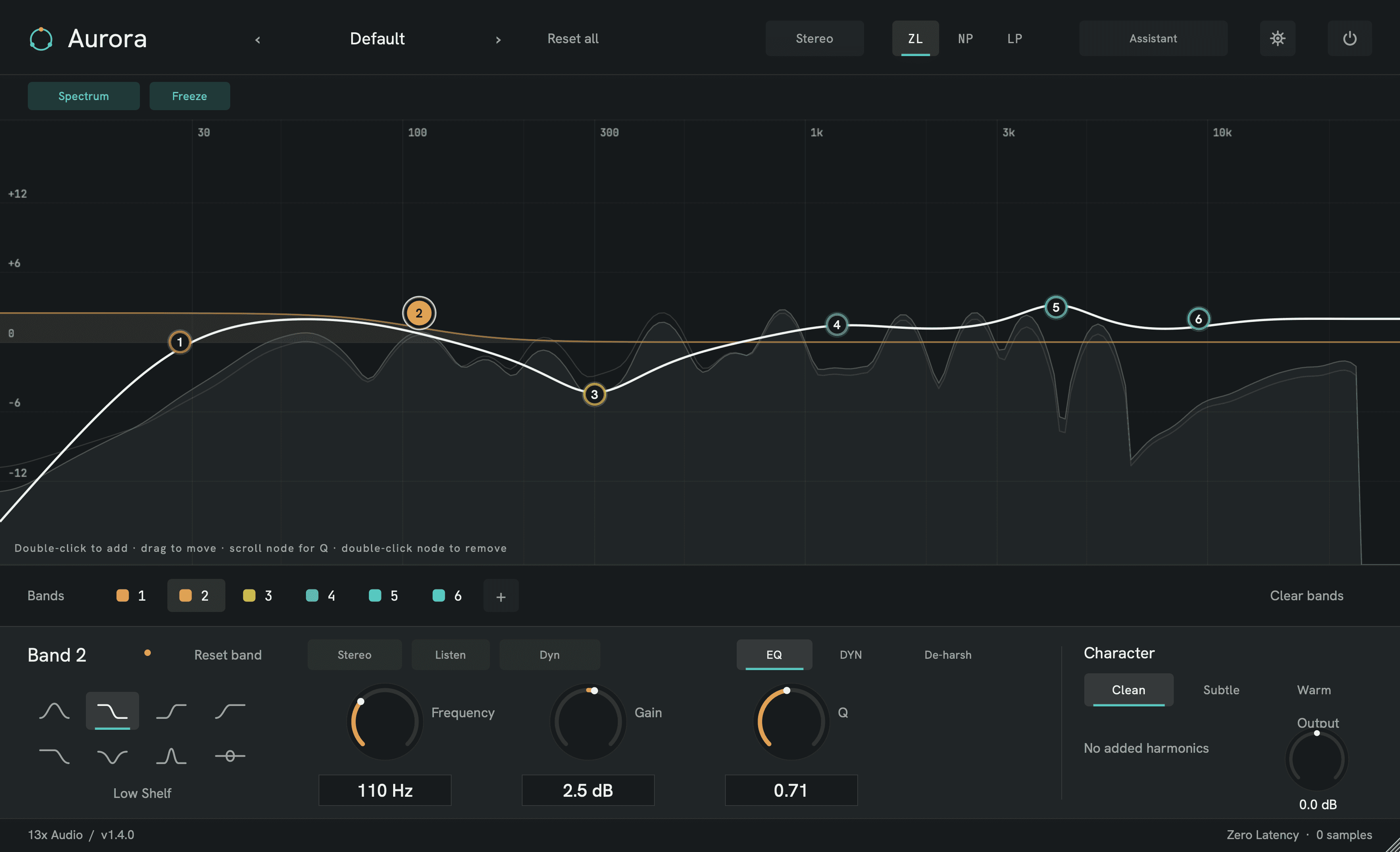
Ein dynamischer parametrischer EQ in Studioqualität, den du mit der Hand modellierst: bis zu 24 Bänder auf einem Live-Spektrum, Dynamik pro Band, spurübergreifendes Freistellen, drei Phasenmodi — und ein Assistent, der die Fleißarbeit auf einen Klick erledigt.

  • VST3 · CLAP · AU · LV2
  • Windows · macOS · Linux
  • Latenzfrei bis linearphasig
  • Kein Lizenzschlüssel
13X
AURORA
Stereo
Vocal Air & Clarity
Preset
-12-60+6+12301003001k3k10k123456
Double‑click to add · drag to move · scroll node for Q
Bands
1
2
3
4
5
6
Band 5Bell
4.20 kHz
Freq
+4.2 dB
Gain
1.40
Q
Character
Transparent, phase-honest — no added harmonics.
+0.0 dB
Output
AURORA by 13X · Parametric EQ · ZL Phase · Clean Character

Live — Band ziehen · Doppelklick setzt ein neues · Scrollen ändert das Q

Ansehen

31 Sekunden in AURORA.

Die Kurve, Smart Ops und die Dynamik-Engine in Bewegung — direkt aus dem ausgelieferten Build aufgenommen. Ton an. Von YouTube lädt nichts, bevor du auf Play drückst.

◇ Streams from YouTube (privacy-enhanced mode) when you press play — nothing loads until then.

In AURORA

Der ausgelieferte Build · nichts nachgestellt
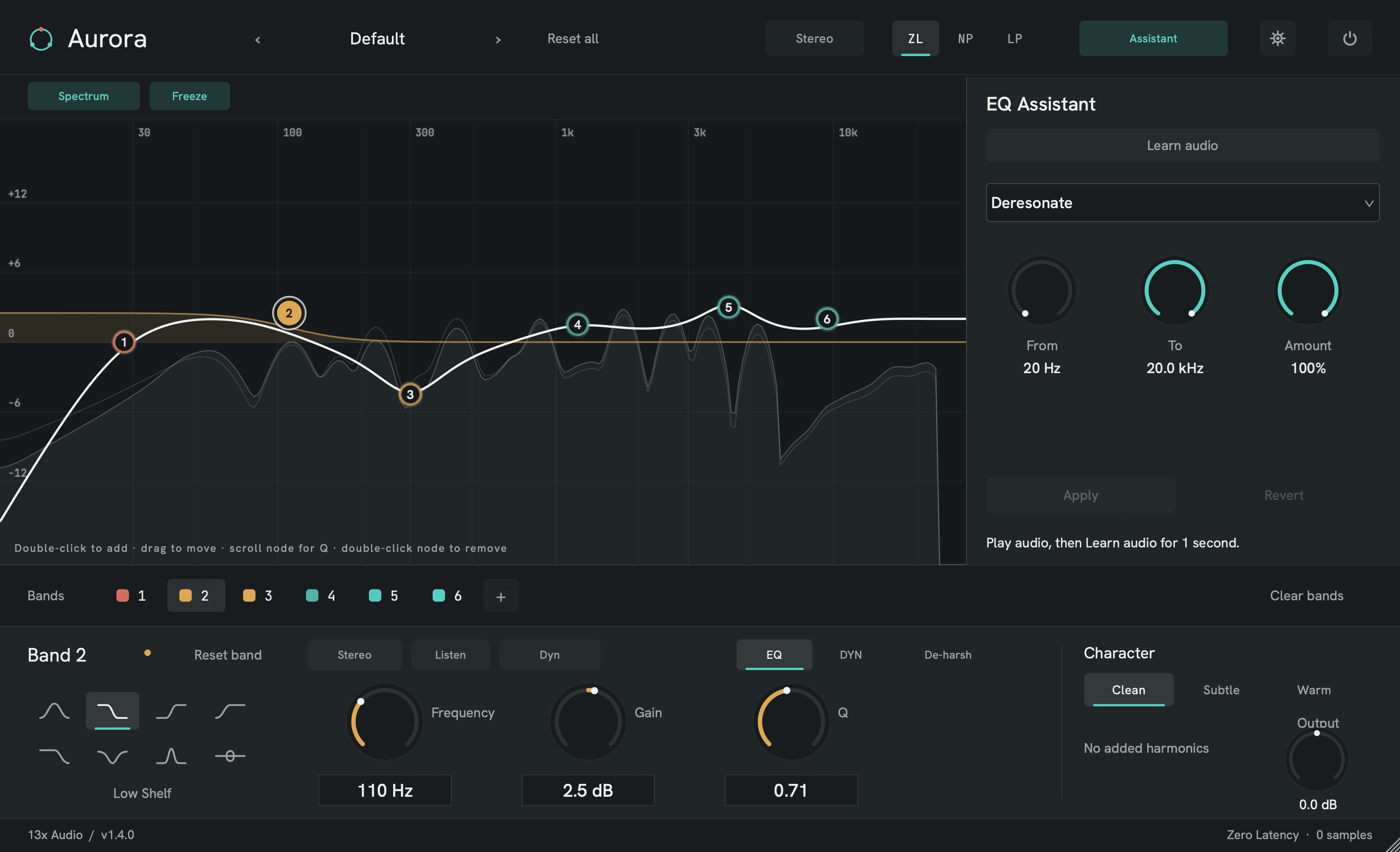
Das Smart-Ops-Panel in AURORA — angleichen, entresonieren, de-essen und freistellen, jeweils eine Aktion, die editierbare Bänder auf die Kurve schreibt
Smart Ops

Ein Assistent, eingebaut in den EQ.

Ein Referenzspektrum angleichen, Resonanzen aufspüren und zähmen, de-essen, automatisch mit Hoch- und Tiefpass klammern, ein Signal gegen ein anderes freistellen. Je ein Klick — und weil echte Bänder auf die Kurve geschrieben werden, gehört dir danach jeder Eingriff. Genau der Teil, den andere EQs extra berechnen.
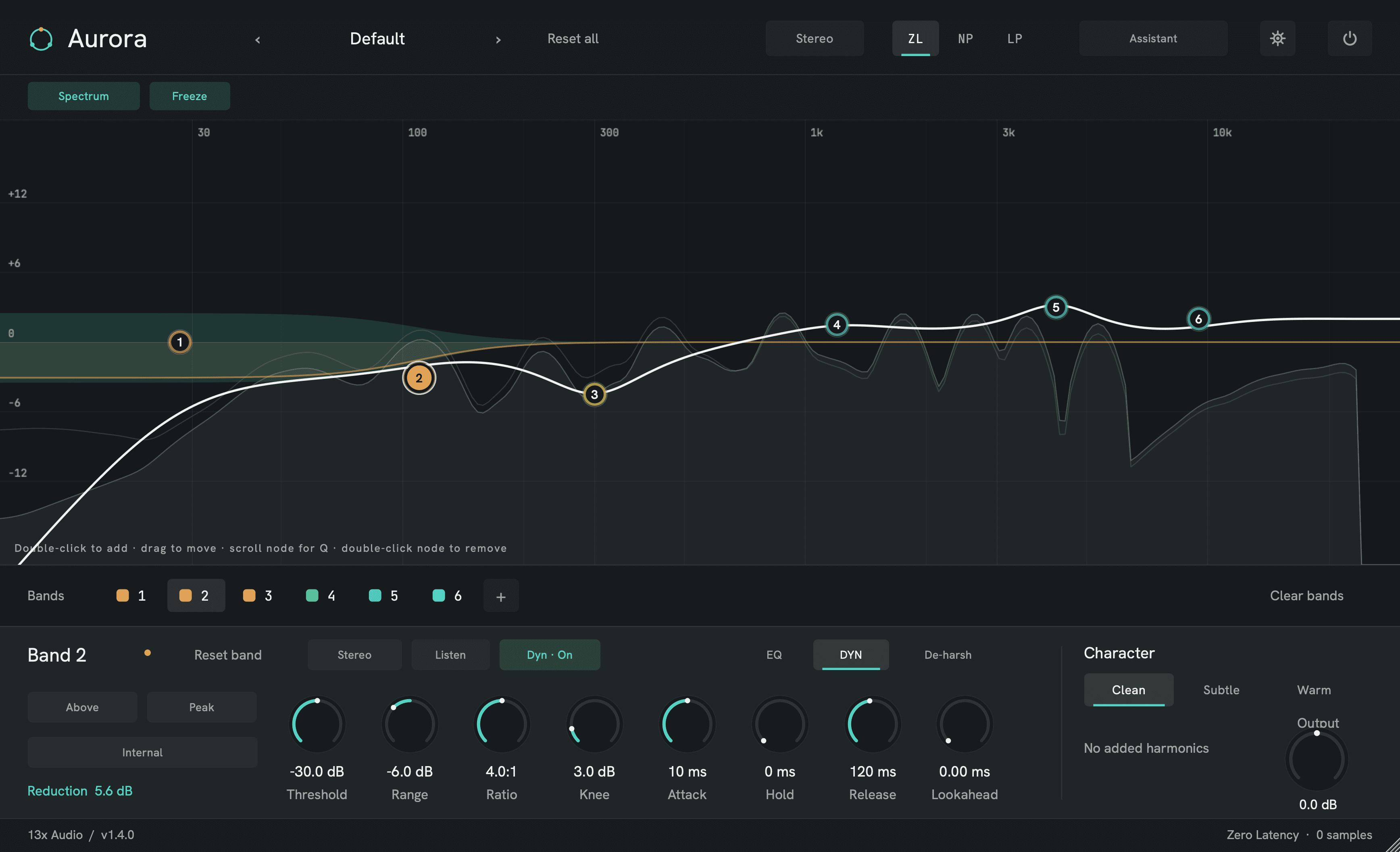
Ein dynamisches Band in AURORA mit geöffnetem Sidechain-Detektor — Threshold, Ratio, Knee und Range, dazu die live gezeichnete Pegelreduktion auf der Kurve
Dynamischer EQ

Ein EQ, der sich mit dem Mix bewegt.

Schalte ein beliebiges Band auf dynamisch, und es greift nur ein, wenn die Frequenz es verlangt. Voller Sidechain-Detektor — Peak oder RMS, Threshold, Ratio, Knee und ein vorzeichenbehafteter Range — damit das Band die resonante Snare auf den Schlägen zähmt und die Ausklänge in Ruhe lässt, oder Luft nur auf den Atmern öffnet.

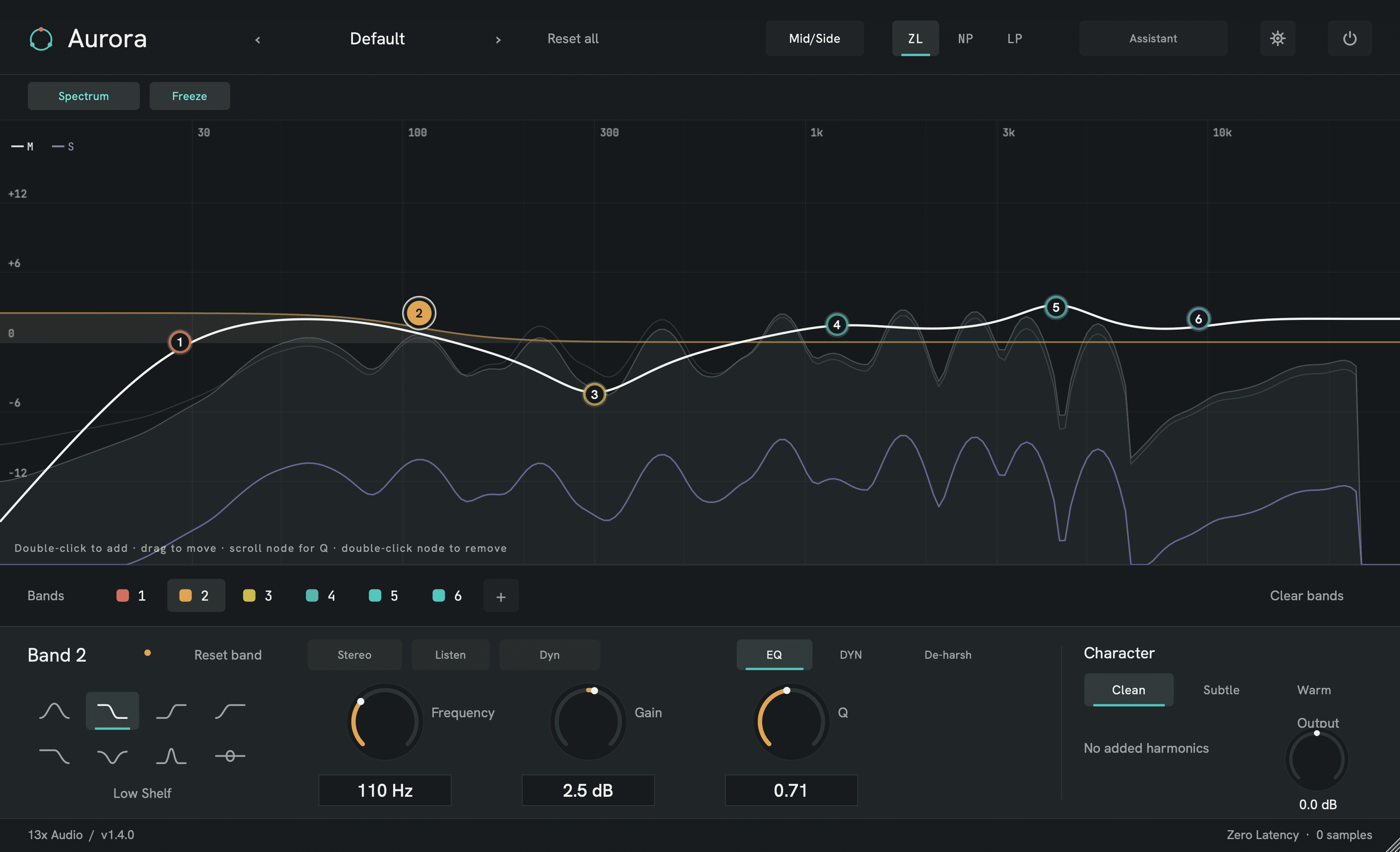
AURORA im Mid-Side-Betrieb — der Analyzer in Mid- und Side-Hälfte geteilt, mit der Band-Platzierung im Inspektor
Stereo & Phase

Mid/Side — und drei ehrliche Antworten auf die Phasenfrage.

Arbeite in Stereo, Mid-Side oder Left-Right mit einem Analyzer, der sich passend teilt, und platziere jedes einzelne Band auf Stereo, L, R, M oder S. Drei Phasenmodi decken die ganze Arbeit ab: latenzfrei beim Aufnehmen, analog-abgestimmt „Natural“ für eine wahrhaftige obere Oktave, und echte Linearphase für die Summe.

Die vollständige Spezifikation

Alles, was im Build steckt

Die Kurve

  • Bis zu 24 Bänder — eines per Doppelklick
  • 8 Formen: Bell, Shelves, Cuts, Notch, Bandpass, Allpass
  • Flanken 6 → 96 dB/Okt. plus senkrechte Brickwall
  • Ziehen bewegt, Scrollen ändert das Q · Live-Analyzer unter der Kurve

Smart Ops

  • Referenzspektrum angleichen, statisch oder dynamisch
  • Entresonieren — resonante Spitzen finden und zähmen
  • De-Essing und automatische Hoch-/Tiefpass-Klammer
  • Jeder Eingriff bleibt danach vollständig editierbar

Dynamik & Freistellen

  • Jedes Band wechselt statisch → dynamisch
  • Sidechain-Detektor · Peak/RMS · Threshold, Ratio, Knee, Range
  • Spurübergreifendes Freistellen — eine Spur gegen eine andere ducken
  • De-Harsh — Schärfe spektral zähmen, nur wenn sie beißt

Phase, Stereo & Charakter

  • Latenzfrei · analog-abgestimmt „Natural“ · Linearphase
  • Stereo, Mid-Side oder Left-Right — Analyzer teilt sich passend
  • Platzierung pro Band: Stereo, L, R, M oder S
  • Clean · Subtle · Warm — analoger Charakter
Das ganze Plugin

Alles drin. Nichts zu zahlen.

Es gibt keine Bezahlstufe, kein Freischalten, keinen Upsell in AURORA. Was du lädst, ist der ausgelieferte Build mit allen Funktionen aktiv — dieselbe Datei, die wir selbst benutzen.

  • Das vollständige Plugin — keine Testgrenzen, keine gesperrten Funktionen
  • Smart Ops — angleichen, entresonieren, de-essen & freistellen
  • Windows, macOS & Linux · VST3, CLAP, AU & LV2
  • Updates auf Lebenszeit — kein Abo, kein Konto
Builds
Noch nicht veröffentlicht
VST3 · CLAP · AU · LV2
PreisGratis
ohne Key

Auf dieser Umgebung sind die Builds noch nicht live. Trag deine Adresse ein — wir schicken den Link, sobald es so weit ist.

Kein Konto · offline nutzbar · SHA-256 für jeden Build veröffentlicht

Lieber den Link per E-Mail — für den Studiorechner oder mit Release-News?

Systemvoraussetzungen

Was es zum Laufen braucht
Betriebssystem
Windows 10/11 (64 Bit) · macOS 11+ (Universal) · Linux x86_64 (glibc 2.35+)
Prozessor
Moderne 64-Bit-CPU — Apple Silicon, Intel oder AMD
Arbeitsspeicher
4 GB RAM mindestens · 8 GB empfohlen
Host
Jede VST3-/CLAP-DAW — FL Studio, Ableton, Bitwig, Cubase, Reaper… — dazu Ardour über LV2
Formate
VST3 · CLAP — dazu AU unter macOS, LV2 unter Linux — nur 64 Bit
Latenz
Null in Latenzfrei / Natural · gemeldete PDC in Linearphase
Samplerates
44,1 – 192 kHz
Speicherplatz
~16 MB installiert
Autorisierung
Kostenlos — kein Lizenzschlüssel · offline nutzbar

Release Notes

Jede Version, offen einsehbar
1.3.3Veröffentlicht 28. Juli 2026macOS

This release makes Aurora faster to work with and more dependable inside the host, while keeping the 1.3 matte interface and parameter map intact.

  • Your editor size now sticks. Aurora remembers its last scale across close/reopen and wrapper-tab changes, while still respecting sizes restored by the host.
  • Faster precision moves. Ctrl/Cmd + wheel gives five-times-finer control; Alt-click a band node toggles Listen; modifier-wheel gestures make Q, cut slope and cut-knee edits deliberate.
  • More restrained Character modes. Subtle adds quiet even/odd harmonics; Warm is now H2-focused with a much faster upper-harmonic taper. Clean remains transparent.
  • Safer editor lifecycle. Update checks cancel cleanly, background workers shut down in order, and repeated editor creation/removal is bounded and regression-tested.
  • Literal unity at the default. Zero-gain bells/shelves and the nominal 0 dB output centre now bypass floating-point residue; the full fresh Clean path nulls sample-for-sample.

Existing projects, presets and automation load without migration. Subtle and Warm intentionally use the new, gentler voicings.

macOS ships as a universal Apple Silicon + Intel build with VST3, AU and CLAP, signed and notarized by Apple.

1.3.0Veröffentlicht 16. Juli 2026Windows · Linux

The interface has been rebuilt from the ground up since 1.0 — this build brings Windows fully up to date with the current design:

  • Matte, card-on-stage look. A floating matte-black surface on a pure-black stage, teal as the single state accent, eight muted pigment band colours with the signature translucent per-band fills.
  • One control line. All knobs live on a single row with an EQ · DYN · DE-HARSH page selector — enabling Dyn jumps straight to the DYN page and gain reduction reads live next to the selector. The window is dramatically more compact.
  • Sharper type, calmer analyzer. True CSS-pixel typography with real Medium/SemiBold weights, gentle display smoothing on the spectrum, a quieter pre-EQ ghost and a glowing master curve.

No changes to sound, parameters or sessions — existing projects load unchanged; hosts show the new window size on next open.

Ships as a plain zip: unzip, then drop Aurora.vst3 into your VST3 folder (Aurora.clap into CLAP). No installer, no SmartScreen warning.

1.2.2Veröffentlicht 16. Juli 2026macOS

Layout refinements to the matte rebuild, straight from user feedback:

  • No window-in-a-window. The frame and outer padding are gone — the matte surface *is* the plugin, and the display runs truly edge to edge.
  • One control line. All knobs live on a single row with an EQ · DYN · DE-HARSH page selector — the dead space below the controls is gone and the window is dramatically more compact.
  • Enabling Dyn jumps straight to the DYN page; gain reduction reads live next to the selector.

No changes to sound, parameters or sessions — existing projects load unchanged. The window is more compact; hosts will show the new size on next open.

1.2.1Veröffentlicht 16. Juli 2026macOS

This is the interface Aurora was meant to have — implemented 1:1 from our final design master, replacing yesterday's interim look:

  • Matte black. A pure-black stage, a solid near-black window, film-grain quiet. No gradients, no glows.
  • Pigment bands. Eight muted band colours, and every band now paints a translucent fill of exactly what it does to the spectrum — the whole EQ is readable at a glance.
  • One accent. Teal marks state — active Spectrum, Dyn engaged, gain reduction — and nothing else.
  • Flat, precise nodes with dark numerals, a white outline on the selected band, and a monochrome analyzer that stays out of the way.

Kept from 1.2.0: the band-delete Restore chip, centre-detent bipolar knobs (Gain/Output/Range), the documented gestures, and the readability contrast floor.

No changes to sound, parameters or sessions — existing projects load unchanged.

1.2.0Veröffentlicht 16. Juli 2026macOS

One interface, rebuilt 1:1 from our original design master. The three-theme experiment is over — Aurora now ships a single, definitive look: the glass-bead band nodes, the glowing response curve, the gradient wordmark, the full aurora stage. Every 1.1 feature (per-band dynamics, De-Harsh, Smart Ops, Listen, placement) redrawn in that language.

New — and honest:

  • Real input/output meters. Peak bars per channel with a shared dB ruler (−36…+6), an emphasized 0 dBFS tick, peak-hold and a clip indicator — fed by the actual audio path, not an animation.
  • Band-delete safety net. Double-click removes a band; a Restore chip brings it back, parameters intact. The gesture is now documented right on the display.
  • Centre-detent knobs. Bipolar controls (Gain, Output, Range) fill from 12 o'clock — +0.0 dB finally *looks* like zero.
  • Readability pass. All small labels lifted above the accessibility contrast floor.

No changes to sound, parameters or sessions — existing projects load unchanged. Note: the plugin window proportions changed with the redesign; hosts will show the new size on next open.

1.1.1Veröffentlicht 16. Juli 2026macOS

Three UI themes — "Pro" is the new default.

  • Pro (default): flat and restrained — no glows, no gradient washes, a calm steel analyzer tone, crisper buttons. Colour only means something: band identity and state.
  • Black (new): strictly monochrome on pure-black chrome — white spectrum, white controls; only the band markers on the graph keep their colours.
  • Aurora: the original glow look, unchanged.

Switch anytime: More from 13x → Theme (bottom-left of the plugin). Your choice is remembered across sessions and applies to all open instances.

No changes to sound, parameters or sessions — existing projects load unchanged.

Fragen

Ist AURORA eine gute kostenlose Alternative zu FabFilter Pro-Q?

Es deckt vieles davon ab — Live-Spektrum, bis zu 24 dynamische Bänder, Mid/Side und Linearphase — dazu den Smart-Ops-Assistenten auf einen Klick, kostenlos. Pro-Q ist heute das reifere Produkt; AURORA läuft unter Windows, macOS und Linux, also auf einer Plattform mehr.

Brauche ich ein Konto für den Download?

Nein. Der Download-Button ist ein direkter Link. Es gibt zusätzlich einen optionalen E-Mail-Weg, falls du den Link lieber an den Studiorechner geschickt bekommst, und auf diesem Formular eine optionale Newsletter-Checkbox — beides freiwillig, nichts davon Pflicht.

Läuft es weiter, wenn es 13x nicht mehr gibt?

Ja. Es gibt keinen Lizenzserver, keine Aktivierung und keine Online-Prüfung. AURORA läuft offline und öffnet deine Sessions weiter, was auch immer mit uns passiert.

Woran erkenne ich, dass der Download sicher ist?

Der SHA-256 jedes Builds steht neben seinem Download-Button — bilde den Hash der erhaltenen Datei und vergleiche. Unter Windows zeigen Chrome und Edge womöglich eine Reputationswarnung für neue Herausgeber; AURORA ist dort noch nicht signiert, und die Prüfsumme ist ohnehin der verlässliche Weg.

Hör auf zu suchen.
Fang an zu mischen.

Lade AURORA und entscheide in fünf Minuten, ob es in deine Kette gehört. Nichts zu kündigen, falls nicht.